3DS Authentication: Fix Hidden Failures That Cost 2-5% Approvals
3DS authentication killing conversions? Learn why 3D Secure authentication fails, how frictionless authentication works, and 5 fixes to recover lost approvals without increasing fraud.
You enabled 3D Secure authentication. Fraud dropped. But so did conversions.
Sound familiar? You're not alone.
Many subscription merchants turn on 3DS and assume they're protected. What they don't realize: hidden implementation mistakes quietly drain 2-5% of legitimate approvals. DECTA research found U.S. merchants can lose up to 15% of conversions when 3DS is misconfigured.
This guide explains what 3DS authentication is, why it backfires, and how to fix it.
What Is 3DS Authentication? (3D Secure Explained)
3D Secure is an extra verification layer for online card payments. Think "Verified by Visa" or "Mastercard Identity Check."
Here's how it works: three parties coordinate to verify the cardholder.
- Your customer's bank (the issuer)
- Your payment gateway (the acquirer)
- The card network's 3DS platform
When a customer enters their card, data flows between these parties. The issuer decides: Is this really the cardholder?
If confident, the transaction passes silently. That's called frictionless authentication. If not, the customer sees a challenge, like entering a one-time code.
The 3DS Authentication Flow
| Step | Party | Action | Customer Experience |
|---|---|---|---|
| 1 | Customer | Enters card details | Normal checkout |
| 2 | Your gateway | Sends transaction data to 3DS server | Invisible (under 2 seconds) |
| 3 | Card network | Routes authentication request to issuer | Invisible |
| 4 | Issuing bank | Analyzes risk signals + 3DS verification data | Invisible or challenge appears |
| 5 | Issuer decision | Approves frictionlessly OR triggers challenge | No action needed OR enter OTP/biometric |
| 6 | Result | Transaction approved or declined | Payment complete or fails |
The entire 3DS verification process should take under 30 seconds. If it takes longer, you've got a configuration problem.
Why 3D Secure Authentication Matters for Subscription Commerce
Subscription businesses face unique risks. One fraud event can become recurring fraud. Chargebacks pile up fast, and chargeback alerts stop many of them before they post. Understanding the difference between chargebacks and refunds becomes critical when 3DS shifts liability.
3DS offers two benefits: fraud reduction and liability shift. When authentication succeeds, the issuer, not you, bears fraud liability.
But here's the catch. A clunky 3DS flow kills signups. Lose a customer at checkout, and you lose their entire lifetime value.
The High-Risk Reality
If you operate in nutra, CBD, gaming, or adult verticals, 3DS gets more complicated.
Issuers already view high-risk MCCs with suspicion. Add a 3DS request, and some banks interpret it as confirmation of elevated risk. They decline preemptively.
Consider this scenario: A CBD subscription customer hits checkout. Their bank triggers a 3DS challenge. The OTP arrives late—or the customer hesitates, worried this unfamiliar prompt is a scam. They abandon.
You didn't lose them to fraud. You lost them to the friction your 3DS setup created.
The 3DS Authentication Trade-Off: Security vs. Friction
Let's be honest about both sides.
The Upside
3DS reduces fraud and chargebacks. It shifts liability to issuers on authenticated transactions. Some issuers approve more when they trust the authentication.
The Downside
Friction kills conversions. A OnePoll survey via Signifyd found 36% of UK shoppers failed purchases due to 3DS friction. In France, 45%. Italy hit 50%.
In the U.S., Baymard Institute research shows 22% of cart abandonment stems from "checkout too long." Extra verification steps contribute directly.
Here's the counterintuitive part: Signifyd's data shows North American merchants only send 2.7% of transactions to 3DS, yet fraud rates on those run 6× higher than overall CNP fraud.
Why? Merchants only use 3DS for suspicious orders. Issuers notice and assume any 3DS request signals high risk.
3DS Version Comparison: What You're Missing
| Feature | 3DS 1.0 (Legacy) | 3DS 2.0 | 3DS 2.2 | 3DS 2.3.1 (Latest) |
|---|---|---|---|---|
| Data fields sent | 15 basic fields | 150+ fields | 150+ fields | 150+ fields |
| Frictionless authentication | No | Yes | Yes | Yes |
| Mobile app support | No (browser only) | Native SDK | Native SDK | Native SDK + biometric |
| Challenge display | Pop-up redirect | In-app/browser | In-app/browser | In-app/browser |
| Recurring exemptions | No | Limited | Yes | Yes |
| Trusted beneficiary | No | No | Yes | Yes |
| Passkey support | No | No | No | Yes |
| Average completion time | 90+ seconds | 37 seconds | 25 seconds | 18 seconds |
| Typical friction rate | 95%+ | 40-60% | 25-35% | 15-25% |
If you're still on 3DS 1.0, you're burning money. Upgrade immediately.
Hidden Mistakes That Crush 3DS Approval Rates
Your 3D Secure authentication might be "working" while silently costing you sales. Watch for these pitfalls.
1. Incomplete Data Sent to Issuers
3DS 2.0 supports 150+ data fields. Many merchants send only the basics.
DECTA's research puts it bluntly: merchants "relying on the original 15 data points fail to provide critical information, causing issuers to default to conservative models."
The fix: work with your gateway to populate all relevant fields. If you're running multiple gateways, payment routing optimization can help you route 3DS transactions to gateways with the best frictionless rates.
What to send beyond card details:
- Device fingerprint and IP address
- Billing address (full, not just ZIP)
- Shipping address (if different)
- Customer email and phone
- Account age and transaction history
- Previous 3DS authentication success
- Time since last purchase
2. Not Using 3DS 2.2 Features
3DS 2.2 introduced exemptions and whitelisting. If you haven't upgraded, you're forcing 3DS when you don't need it.
Example: a gaming subscription customer authenticated at signup. Without the recurring exemption flag, they face a challenge on every monthly renewal. By month three, they're annoyed. By month five, they've cancelled.
That's not fraud prevention. That's customer destruction.
3. Mobile-Unfriendly Flows
Over half of transactions happen on mobile. Yet many merchants use browser-based 3DS flows.
Pop-ups, redirects, and tiny input fields frustrate mobile users. Ravelin research found 91% of 3DS attempts cause friction longer than 5 seconds. Average added time: 37 seconds. On mobile, that's an eternity.
The fix: use native mobile SDKs. Ensure challenge screens render properly on all devices.
4. Incorrect Challenge Settings
The 3DS Requestor Challenge Indicator tells issuers your preference. Misconfigure it, and you'll see problems.
Always requesting challenges? Users drop off. Always requesting frictionless? Issuers decline risky-looking attempts without giving customers a chance to verify.
Dynamic configuration works best. Match your settings to actual transaction risk.
5. No Monitoring
Set-and-forget is a silent killer. Without tracking 3DS outcomes, you'll never spot problems. Maybe one issuer's system always times out. Maybe a specific BIN range fails constantly. You won't know unless you watch.
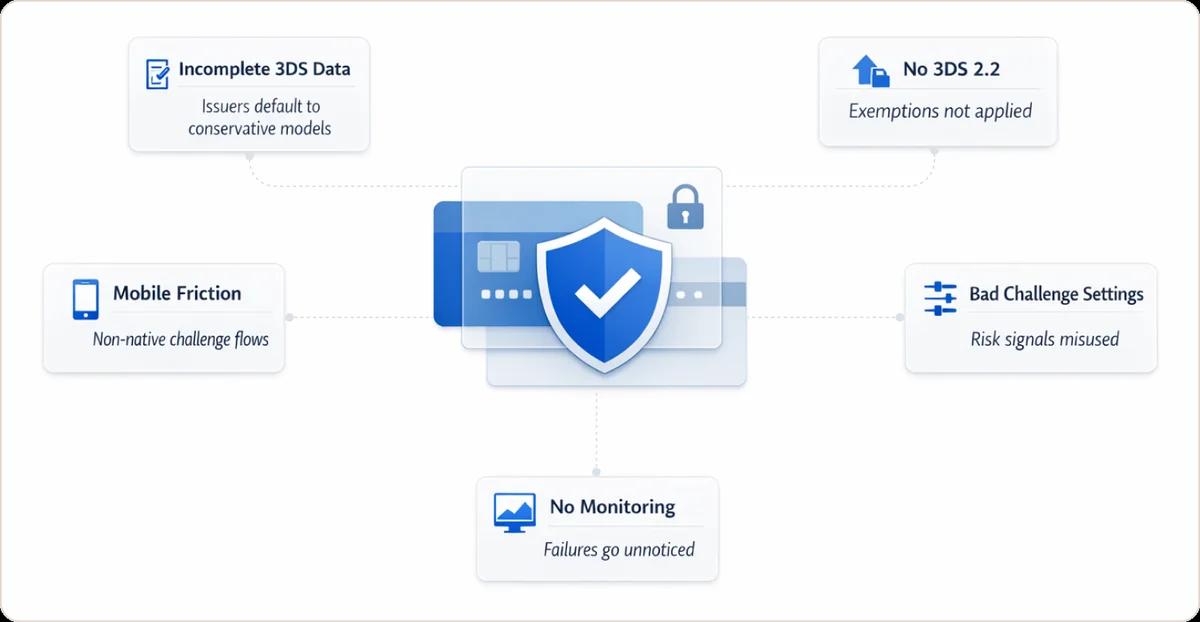
This is where approval rate monitoring becomes critical. You need unified visibility across gateways to see which combinations of issuer, gateway, and 3DS configuration are bleeding approvals.
When customers see '3d secure authentication failed' errors repeatedly, they don't retry. They leave. I've analyzed hundreds of checkout flows where merchants lost 15-20% of customers to authentication failures that could have been prevented with better mobile optimization.
Common 3DS Authentication Failures: What They Mean
| Error Message | What Happened | Most Common Causes | How to Fix |
|---|---|---|---|
| "3D Secure authentication failed" | Customer couldn't complete verification | Wrong OTP entered, timeout, issuer rejection | Retry with fresh card details, try different browser, contact issuing bank |
| "Authentication unavailable" | Issuer's 3DS server didn't respond | Technical issue at issuing bank, network timeout | Wait 10 minutes and retry, try different card |
| "Card not enrolled" | Card doesn't support 3DS | Old card, issuer hasn't enabled 3DS | Process without 3DS (if permitted in your region) |
| "Transaction denied by issuer" | Bank blocked after successful authentication | Fraud rules triggered on bank side, insufficient funds | Customer must contact their bank |
| "Challenge window timeout" | Customer didn't complete challenge in time | Slow mobile connection, customer confusion | Optimize challenge window settings (extend to 10 min), improve mobile UX |
When I see "3D Secure authentication failed" errors spiking, it's usually one of three things: the issuer changed their 3DS server settings, your gateway updated something and broke the integration, or you're hitting mobile users with a desktop-optimized flow.
Is a Failed 3DS Check the Same as a Card Decline?
No. A failed 3D Secure check is an authentication failure. 3D Secure is a card authentication step run before the charge. It is not a payment decline. The issuer can still refuse the charge even after authentication succeeds. Learn the difference between an issuer decline and how a soft decline versus a hard decline changes whether you should retry.
What each outcome actually means:
- Authentication failure: the cardholder could not complete the 3DS challenge, so the transaction never reaches an approval decision.
- Soft decline: the issuer asks for authentication or a retry, so a fresh attempt with SCA can recover it.
- Hard decline: the issuer refuses outright (lost card, closed account), so retrying the same card will not help.
Keep your checkout and stored-card flows aligned before you retry anything. Follow a PCI DSS compliance checklist. PCI DSS is the card industry's data security standard. Beast Insights breaks declines down by decline code, issuer, BIN, gateway, and MID. BIN is the bank identification number, the first digits of a card. MID is your merchant ID at the processor. You can then see whether a spike traces back to 3DS, the issuer, or the card brand.
The 3DS Authentication Fix-It Checklist
Turn 3D Secure authentication from a conversion drain into a competitive advantage.
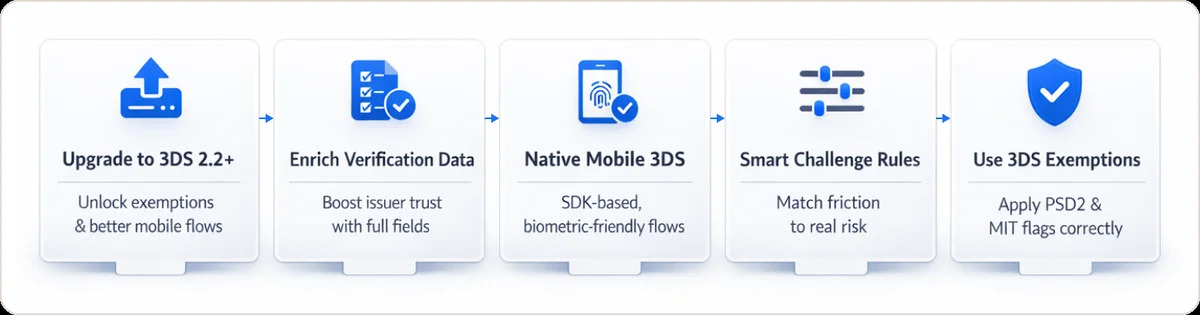
Upgrade to 3DS 2.2 or Higher
Check with your payment provider. Newer versions support exemptions, whitelisting, and better mobile flows. Version 2.3.1 even supports passkeys.
Enrich Your 3DS Verification Data
Send all available fields in authentication requests. Ideem's analysis confirms that using the full range of 150+ data fields significantly boosts issuer trust and frictionless approval rates.
Implement Native Mobile 3DS
Use your gateway's mobile SDK. Aim for authentication under 30 seconds total. Enable biometric options where available. Fingerprint and Face ID convert better than SMS codes.
Mobile 3DS best practices:
- Pre-load the 3DS SDK before checkout
- Use in-app challenges (not browser redirects)
- Support biometric authentication
- Show a progress indicator during verification
- Cache successful authentications for recurring payments
Use Smart Challenge Rules
Set the challenge indicator dynamically. Request frictionless for trusted, repeat customers. Reserve challenges for genuinely high-risk transactions: new users, high amounts, mismatched AVS.
Apply 3DS Exemptions
For EU transactions, use PSD2 exemptions: low-value, recurring, trusted beneficiaries. For subscriptions everywhere, flag subsequent charges as Merchant Initiated Transactions (MIT). This tells issuers the customer is already authenticated. Don't challenge them again.
PSD2 Exemption Strategy for Subscription Merchants
| Exemption Type | When to Use | Requirements | Risk Level |
|---|---|---|---|
| Low-Value | Transactions under €30 | Cumulative value under €100 OR fewer than 5 transactions since last SCA | Low |
| Recurring Payment | Subscription renewals | First payment must use SCA, same amount each time | Very Low |
| MIT (Merchant Initiated) | Usage-based billing, add-ons | Initial setup authenticated with SCA | Low |
| Trusted Beneficiary | Customer whitelisted your business | Customer added you via their banking app | Very Low |
| Transaction Risk Analysis (TRA) | Based on your fraud rate | Fraud rate <0.13% (under €100) or <0.06% (under €250) | Medium |
Monitor and Iterate
Track these metrics weekly: challenge rate, challenge success rate, abandonment during 3DS, and approval rate by issuer and BIN.
This is where most merchants fall short. They have 3DS data scattered across gateways with no unified view. Gateway compliance monitoring becomes critical, especially when you're running transactions through multiple processors and need to spot which combinations of issuer, gateway, and 3DS configuration are bleeding approvals.
Quick Compliance Notes
EU/UK: 3DS is mandatory under PSD2/SCA. Banks soft-decline non-authenticated transactions.
U.S.: 3DS is optional. Card networks offer liability shift for authenticated transactions.
India/APAC: Authentication requirements vary by market.
Know your markets. Apply 3DS where mandated. Use it strategically elsewhere.
I've worked with merchants who applied EU-style mandatory 3DS to their U.S. customers and watched conversion rates crater by 12%. Don't do that. Configure regionally.
Bottom Line: 3DS Authentication Done Right
3DS authentication isn't the problem. Poor implementation is.
Hidden failures, incomplete data, outdated versions, mobile friction, and wrong settings quietly cost merchants 2-5% of approvals. For high-risk subscription businesses, that's unacceptable.
The good news: these are fixable. Upgrade your 3DS version. Enrich your data. Use exemptions smartly. Monitor outcomes.
At Beast Insights, we help subscription merchants connect payment data across gateways to surface these patterns. When you see 3DS outcomes by issuer, BIN, and gateway, side by side, the hidden failures become obvious. And fixable.
Done right, 3DS becomes a conversion advantage, not a liability.
Frequently Asked Questions
Is 3D Secure authentication mandatory in the US?
No. Unlike Europe under PSD2, 3DS isn't legally required in the U.S. Merchants can choose it for fraud protection.
Does 3DS increase or lower approval rates?
Both are possible. 3DS blocks fraud, improving legitimate approval rates. But poor implementation can drop approvals by 5% or more, according to Stripe's U.S. transaction analysis.
What's the difference between 3DS 1.0 and 3DS 2.0?
3DS 1.0 used password pop-ups that killed conversions. 3DS 2.0 allows "frictionless" authentication, supports mobile apps, and lets merchants send 10× more data for smarter risk decisions.
Why do I still get declines after 3DS authentication?
3DS verifies identity, but it doesn't guarantee approval. If a customer fails the challenge, times out, or if issuers still suspect fraud based on other signals, transactions decline.
How do I reduce 3DS failures for subscription renewals?
For merchants struggling with recurring payment failures beyond 3DS issues, check out our guide on failed payment recovery strategies to recapture revenue from expired cards and soft declines.
What is frictionless 3DS?
Frictionless means the bank authenticated silently, no customer action required. It uses background data analysis. The more data you send, the more likely issuers are to approve frictionlessly.
What does "3D Secure authentication failed" mean?
This error means the cardholder couldn't complete verification due to a wrong OTP, timed out, or issuer rejection. Common fixes: retry with fresh card details, try a different browser, or contact the issuing bank.
Why does 3DS hurt high-risk merchants more?
Issuers already scrutinize high-risk MCCs. When these merchants only send suspicious transactions to 3DS, issuers learn to associate 3DS requests with elevated risk and decline more aggressively.
Does a failed 3D Secure check count as a decline?
Not exactly. A failed 3DS check means authentication did not complete. 3DS is 3D Secure, a card authentication step. No liability shift applies, so the issuer keeps chargeback responsibility. Many issuers soft-decline the attempt. A soft decline is a temporary refusal you can retry. The bank can still approve a retry once the cardholder authenticates. Beast Insights breaks these outcomes down by decline code and issuer. You can then tell friction from a genuine refusal.
How do I retry a payment after 3D Secure authentication failed?
Retry once you know the cause. Prompt the cardholder to authenticate again in a fresh session if it was a timeout or a wrong OTP. OTP means one-time passcode, the short code the bank sends. Do not re-attempt the same card if the issuer hard-declined. A hard decline is a permanent refusal. Route recurring charges as Merchant Initiated Transactions. These are payments you charge without the customer present. This keeps already-authenticated customers from being challenged twice.