Failed Payment Recovery: Retry Rules, BIN Diagnostics, and Approval Rates
Failed payments cost subscription merchants millions. Strategic retry timing, multiple payment gateways, and smart customer communication can recover most declined transactions and reduce involuntary churn.
Why Failed Payments Hit Subscription Businesses Harder
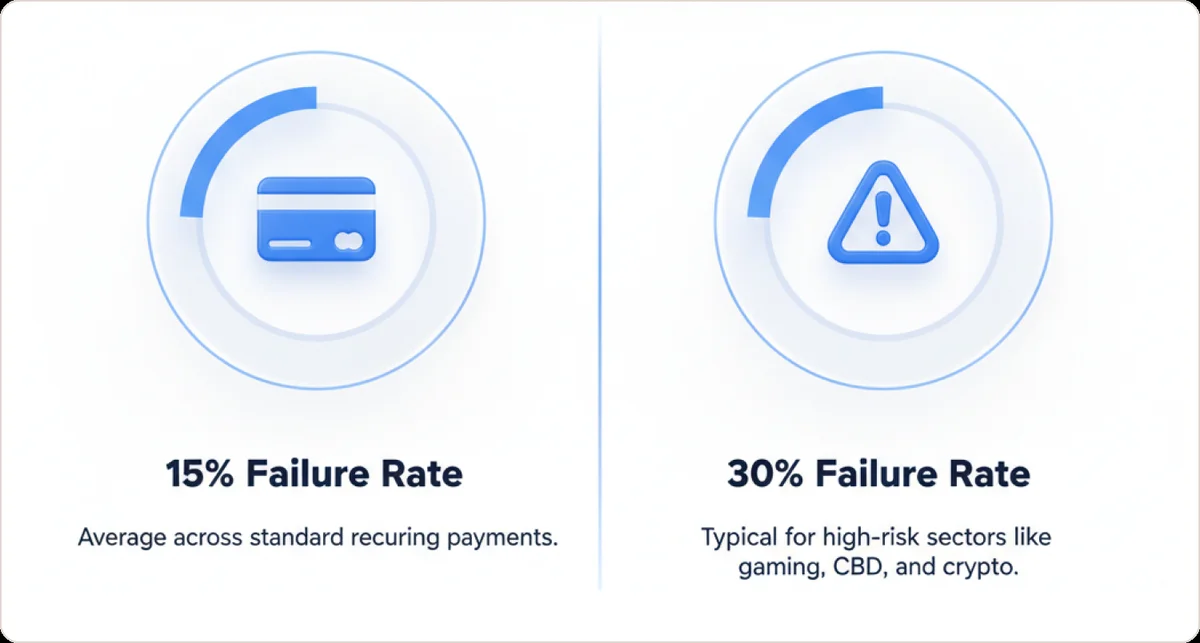
Failed payments disproportionately affect card-not-present subscription businesses, and the pressure is highest in verticals issuers scrutinise more closely, such as nutraceuticals, telehealth and digital subscriptions. The reasons compound across multiple factors.
Bank Policies
Financial institutions automatically decline transactions from certain merchant category codes (MCCs). Gaming platforms and CBD retailers face stricter scrutiny than mainstream businesses. Banks reject charges to minimize risk exposure, regardless of customer intent.
Customer Behavior
Recurring-billing products attract payment methods that fail more often—prepaid cards, frequently replaced cards, or customers who cancel after disputes.
Heightened Fraud Screening
Fraud detection systems flag high-risk MCCs aggressively. False declines total $443 billion annually, with card-not-present merchants suffering disproportionately.
The cost of inaction
Nearly 48% of subscription churn is involuntary—customers lost due to payment failure rather than cancellation choice. 62% of customers experiencing payment failure never return.
Soft vs. Hard Declines: Know What You Can Recover
Soft Decline
A temporary issue worth retrying. Examples include:
- Insufficient funds
- Daily limit exceeded
- Network timeout
- Issuer system glitch
Roughly 80-90% of declines are soft, representing recovery opportunities.
Hard Decline
A permanent failure for that payment method. Examples include:
- Stolen card
- Account closed
- Invalid card number
Retrying hard declines wastes effort and risks compliance violations. Instead, immediately notify the customer to provide new payment details.
Smart failed payment recovery strategies focus exclusively on soft declines—the substantial pool of recoverable transactions.
Should I retry a declined subscription payment or stop?
The decline code decides your next move, not you. Visa Category 1 codes cover 41 lost card, 43 stolen card, 46 closed account and R0 stop payment. Never reattempt those codes. One reattempt already counts as excessive. Retryable declines cap at 20 attempts per 30 days on Visa, raised from 15 in May 2025. Start with the soft decline vs hard decline split.
- Stop immediately: Visa Category 1 and Mastercard MAC 03 (do not try again) or MAC 21 (cancelled). Retrying card-not-present on the same card and amount within 30 days earns a fee.
- Retry on a clock: Mastercard MAC 24 to 30 encode waits of 1 hour, 24 hours, 2, 4, 6, 8 and 10 days, so the issuer sets your schedule.
- Stay under the ceiling: 20 reattempts per 30 days on the same card and merchant pair since 25 May 2025, with roughly $0.10 per excess domestic attempt and $0.05 more cross-border.
- Practical stopping rule: most recoverable payments resolve in the first two retries, and vendors suggest 3 to 6 attempts across 5 to 14 days.
- Decide the endgame before you start: cancel, mark unpaid, or leave past_due. After the final scheduled attempt, nothing else is charged.
How Smart Retry Tactics Work
Timing Is Everything
Retry timing dramatically affects outcomes. A payment failing Monday morning due to insufficient funds benefits from a Friday retry attempt (after typical paychecks) rather than Monday afternoon when nothing has changed.
Historical patterns show transactions succeed more often at 8 AM than midnight for certain demographics, or on the 1st of the month when many cards are charged successfully.
Best practice: Space attempts. Avoid "woodpecker" behavior of multiple pings in minutes—that triggers fraud flags. Structure retries over days or weeks instead.
Routing and Payment Gateways
If the first try failed with Processor A, smart systems automatically attempt Processor B on the next attempt. This approach alone recovers about 8% of failed transactions immediately, since different banks approve charges rejected elsewhere.
This requires multiple payment providers or an orchestration platform. Subscription merchants often maintain multiple accounts to avoid single-processor concentration risk. Smart routing uses that setup for recovery, particularly useful for merchants managing failed Stripe payments with backup processing options.
Your payment gateway configuration and MID health significantly impact retry success rates—keeping your merchant accounts in good standing improves approval rates across all transactions.
Decline-Code-Aware Logic
Smart retries consider why payment failure occurred. It's counterproductive retrying a transaction declined for "card stolen"—you need the customer providing a new card.
Modern tools enable dynamic rules: if decline code = insufficient funds, schedule retry in 3 days; if decline code = expired card, send update email immediately. This intelligence is data-backed, not guesswork.
Silent Recovery (No Customer Friction)
When implemented correctly, customers remain unaware of hiccups—they continue service uninterrupted. A silent retry succeeding means customers avoid inconvenience and businesses avoid losing money.
"Deliveroo recovered £100M in one year using Stripe Smart Retries, meaning customers kept enjoying their food deliveries without account suspension."
These retries happen automatically in background, configured in payment settings. Stripe Billing, Recurly, Chargebee, and similar platforms offer intelligent retry schedules you can customize.
When do gateway-native retries stop being enough?
The retries built into your gateway stop at two lines. The first line is the hard decline, a refusal the issuer will not reverse on a retry. The second line is the end of the retry schedule. Stripe does not retry when the issuer returns a hard decline code. Stripe also does not retry when no payment method is on file. Smart Retries caps the schedule at a two-month window. The recommended default is 8 tries in 14 days.
- Stripe's non-retryable list is the practical definition of "retries are done": incorrect_number, lost_card, pickup_card, stolen_card, revocation_of_authorization, revocation_of_all_authorizations, authentication_required, highest_risk_level and transaction_not_allowed all need the customer to act.
- After a hard decline the Stripe retry schedule keeps ticking without ever charging the card, so attempts climb on your dashboard while no recovery work is happening, and recovery resumes only when the customer gives you a new payment method.
- Merchants who switch Smart Retries off for a custom schedule get a shorter leash, because Stripe caps custom retry rules at three retries.
- Adyen's Auto Rescue draws the same two ceilings: a rescue window you set between 1 and 48 days, 30 recommended, and a class of refusals it calls unrescuable, surfaced as end-of-rescue reasons such as fraudDecline and retryWindowHasElapsed.
- Bank debits get almost nothing from the gateway: Stripe retries ACH Direct Debit twice over 40 days, SEPA and Bacs twice over 30 days, and ACSS and New Zealand BECS once, and only if you enable it.
- When the schedule is exhausted Stripe hands the subscription to a state machine, cancel, unpaid, past_due or paused, rather than to more attempts, which is the point where recovery becomes a lifecycle problem.
- Gr4vy's read of the retry curve is that three to five attempts over 10 to 14 days is the practical optimum, after which the curve flattens and penalty risk rises.
Past that line, the next lever is a different acquirer, not another attempt. An acquirer is the bank that processes card payments on your behalf. Gr4vy puts the gain from retrying the same decline through a different acquirer at 2 to 5 percentage points on top of same-provider retries. Gr4vy also warns that retrying past the useful point burns processing fees. Those extra attempts degrade your standing with issuers. Running failed rebills across multiple merchant accounts carries its own ceiling. Acquirer guidance allows Mastercard only 9 attempts per card in 24 hours.
Where recovery quietly leaks: the dimensions most teams never segment?
A blended recovery rate hides very different leak rates. Involuntary churn runs about 14% on orders under $10 but roughly 4% on orders of $1,000+, and it varies nearly 4x by card type: 23% on prepaid, 11% on debit, 6% on credit. Segment before you fix, using clear payment retry strategies per bucket.
Decline reason matters even more: processing errors recover at 80-90% and insufficient-funds at 70-80%, while a generic 'card declined' recovers only 40-60%. One retry policy across every code leaks the most on the low-yield buckets. Tighten this inside your dunning management workflow so each code gets the cadence it deserves, then track results as you work to reduce payment failed rates.
- Card instrument: prepaid churns at 23%, debit at 11%, credit at just 6%.
- Order value: about 14% involuntary churn under $10, roughly 4% at $1,000+.
- Business model: B2C runs higher than B2B, 9% versus 6%.
- Geography: cross-border transactions fail 15-25% more often than domestic ones.
- Timing: 90% of recovered transactions land within the first 10 days of a failed payment.
Every declined transaction carries the issuer, card type, failure category, time of day, geography and subscriber history, so treating declines as one undifferentiated pool is the leak. Beast Insights breaks recovery, declines and disputes down by decline code, issuer, BIN, gateway/MID, acquirer, card brand and billing cycle so subscription teams fix the actual leak, not the average.
How do I tell which BIN or issuer is declining my rebills?
You cannot ask the bank. Issuers discuss a decline only with their own cardholder. Most decline responses come back generic. So you infer the reason from cohorts. Group transactions on the card fingerprint. Exclude failed retries. Then cut the data by issuing country, card brand and BIN. A BIN is the set of leading digits on a card number that identify the issuing bank. Beast breaks declines down by exactly these dimensions.
- Cut cross-border first. Cards issued outside your processing account's country decline more predictably than any other issuer attribute, so issuing country is the highest-yield first slice.
- Strip out what the issuer never saw. Blocked payments carry network_status: not_sent_to_network, so counting them against a BIN blames a bank for your own risk rules.
- Segment by brand before comparing codes. The network decline code and network advice code are 2 to 4 digits and mean different things per network.
- Watch for new_account_information_available clustering in one BIN cohort: that is an account updater gap, not a customer problem. See how card account updater works.
- Support both BIN lengths. Since April 2022 Visa issues eight-digit BINs while six-digit BINs stay in circulation, and one six-digit prefix can span several issuer ranges.
- Expect a BIN to be a product, not a bank. Issuers subdivide a six-digit BIN into nine-digit account ranges, so a bad BIN is often one prepaid or debit program.
Practical Considerations and Trade-offs
Tools and Infrastructure Needed
Modern billing systems have built-in smart retry or dunning management. If not, consider adding a dunning service (Churn Buster, Stunning) or payment orchestration platform (Spreedly, Primer) for multi-gateway logic.
Cost vs. Benefit
Additional processors mean fees or integration work. Dunning software might have subscription costs or take recovery revenue percentage. But weigh against recovered revenue: if losing $50K/month to failed payments and a solution recovers 20%, that's $10K back—likely outweighing tool cost.
Operational Effort
Monitoring
Track retry outcomes and tune logic. Set KPIs like recovery rate and decline reasons distribution, reviewing monthly.
Customer support
More retries might generate more inquiries. Ensure support teams have gentle scripts ready.
Technology complexity
Multiple gateways increase complexity (reporting across systems, reconciling transactions). It's manageable with proper tools.
Risk of Too Many Retries
According to PayPal's compliance guidelines, merchants should stay within the retry caps. That vendor page still cites approximately 15 attempts in 30 days; Visa's current cap is 20 per 30 days, raised on 25 May 2025. Exceed the cap and you risk fines or bad actor flagging. This is critical for merchants already under a card-network monitoring program.
Configure retry settings within safe bounds (don't exceed 4-5 retries over several weeks).
Multiple charge attempts could appear fraudulent on customer statements or annoy them with bank alerts. Balance recovery with customer goodwill.
Geographic and Currency Considerations
Subscription merchants often transact globally. Sometimes declines stem from cross-border issues. Routing through a local acquirer in the customer's region might help (but requires having that setup). If most declines come from EU cards and you use US processor, consider adding EU-based processor for retries—higher acceptance, though it means multi-currency complexity.
How do I improve rebill approval rates across multiple processors?
Routing pays off only when the credential travels. Network tokens move with you across acquirers. Processor-issued PCI tokens are card substitutes that a single provider stores for you, and they lock you to that provider. Your vault strategy therefore decides whether a second processor is even possible. Beast's MID Performance view shows approval rate and chargeback percentage per MID. A MID is the merchant ID that identifies each merchant account you hold. That evidence lets you route with confidence.
- Tokenize first: Visa reports a 4.6% authorization lift on tokenised card-not-present transactions and Mastercard 2.1%, and tokens survive reissues without customer action.
- Cascade soft declines to a second acquirer. Yuno's analysis of 50 orchestration deployments found an average 8% authorization uplift and 8% of otherwise-lost transactions recovered by fallback routing.
- Route on explicit dimensions: issuer and BIN, geography and currency, MCC. Adding acquirers indiscriminately just adds pricing and operational cost.
- Process locally where you can. Cross-border cards decline more, and local acquiring is what moves domestic baselines of 85 to 90% toward 90 to 95%.
- Spend retry budget where it converts: 40 to 70% of soft declines are recoverable through retry strategy versus 20 to 30% of hard declines.
- A second processor also buys resilience against outages, not just issuer declines.
How do you measure recovery rate honestly, and why does the usual number flatter you?
Start the denominator from every failed transaction in the quarter. Do not start it from the attempts you chose to retry. Three denominators compete for the job. Most vendors quote recovered divided by retried attempts, and that number climbs as retry coverage falls. Recovered divided by all failed volume is the smallest of the three. It is also the one a finance team feels.
- Churn Buster defines recovery rate as recovered campaigns divided by all campaigns in complete cohort days, and keeps the losses in: cancellations and passive churn stay in the denominator, with only voided campaigns excluded.
- Dropping cancellations inflates the rate. Churn Buster keeps them in because the recovery experience itself can cause them, through billing confusion, card-update friction, or a badly timed retry.
- An active campaign counts as neither recovered nor lost, so Churn Buster sets aside any date that still contains one and publishes no partial number for it. Quietly dropping active campaigns shrinks the denominator by exactly the cases whose outcome is unknown.
- Baremetrics argues for the opposite denominator, the failed payments your dunning system actually attempted, because VIP accounts held out of the automated flow and charges the processor's own retry layer rescued before any email fired contaminate the all-failures count.
- Decline mix moves the headline with no change in system quality: Solidgate puts soft declines at 80 to 90% of subscription failures with 40 to 70% recovery ceilings, against hard declines at 10 to 20% with a 20 to 30% ceiling.
- The attribution window changes what the rate means, because a 7-day recovery is a different achievement than a 45-day one, and recoveries after the cycle closes can turn into refund cases.
- Last-touch attribution overstates what dunning emails did by 30 to 60% in most enterprise stacks, so split credit with holdout cohorts that isolate one mechanism at a time, then allocate the overlap.
- The denominator that vendors do not control is harder to argue with: Stripe frames its own Billing recovery as recovered revenue over spend rather than publishing a rate at all.
One number resists every denominator choice: the involuntary churn rate. It is subscribers lost to failed payments divided by subscribers at the start of the period. Churn Buster asks for 30 or more days of completed cohorts before you judge a change. It asks for 60 or more days before you compare a before against an after. Beast Insights breaks recovery, declines and disputes down by decline code, issuer, BIN, gateway/MID, acquirer, card brand and billing cycle. A BIN, or bank identification number, is the first digits of a card that name the issuing bank. A MID is the merchant account ID you hold with an acquirer. Each cut shows you what actually moved, instead of a blended number.
Common Mistakes in Failed Payment Recovery
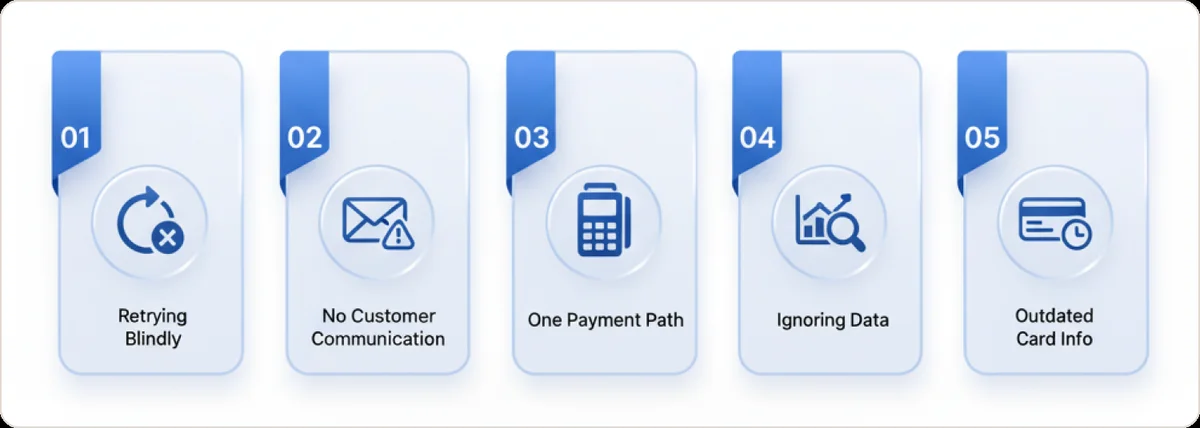
Mistake 1: Retrying blindly, without strategy
Symptoms
Merchants set generic retry (every day, five times) or manually retry whenever they notice a fail, with no rationale.
Why it's bad
Can annoy customers or trigger bank alarms. Wastes effort on hopeless cases.
Smart fix
Implement data-driven retry schedule. Use decline codes: if soft decline, spread attempts over several days at varied times. Limit tries (maybe 4 maximum automatic attempts).
Mistake 2: Failing to communicate with the customer
Symptoms
Business doesn't notify customer until account cancellation. Or only sends generic payment failure email with no guidance.
Why it's bad
Customers might have fixed the issue if they knew. Many don't realize cards expired or were maxed out. Lack of communication leads to unnecessary churn.
Smart fix
Set up dunning email/SMS sequence:
- Email #1 within 24 hours: "Please update your payment, we'll retry soon"
- Email #2 reminder 3 days later if still failing
- Perhaps SMS or in-app notification if emails aren't opened
- Keep tone positive and helpful, not threatening
Clear communication also helps prevent friendly fraud chargebacks by ensuring customers understand their subscription status and billing.
Mistake 3: Only using one payment path
Symptoms
Merchants rely solely on one bank or gateway. If transaction fails there, they give up.
Why it's bad
Puts all eggs in one basket. If that gateway has an outage or algorithm rejecting something, you lose money unnecessarily. Different banks have different appetites—a decline at one might be approval elsewhere.
Smart fix
Diversify payment processing. If possible, have backup processor or smart routing rules. Secondary attempts recover approximately 8% of transactions.
Mistake 4: Ignoring root causes/data
Symptoms
Business treats all failed payments the same and doesn't analyze patterns (do most fails come from one card type? One issuing bank? Always the first charge after free trial?).
Why it's bad
Without insight, you can't improve. You might retry in the morning but failures are mostly due to card expiration—timing won't fix an expired card.
Smart fix
Monitor and analyze declines. Track decline reasons and success rates per attempt. Use data to refine your recovery strategy over time.
Our 5-step approval rate analysis method provides a systematic framework for identifying and fixing payment issues.
Mistake 5: Not updating payment details
Symptoms
Recurring businesses see lots of fails due to expired or replaced cards, but don't use any updater service or proactive customer prompts.
Why it's bad
Expired cards are one of the top decline reasons. If you ignore this, you keep chasing dead ends.
Smart fix
Use tools like Account Updater services (offered by Visa/MasterCard or via processors) which automatically update cards when banks issue new numbers or expiry dates. Also prompt users: send email a month before expiry asking them to update.
Consider implementing pre-authorization charges to validate payment methods before charging, catching expired or invalid cards early in the process.
How do I reduce involuntary churn from failed subscription payments?
Treat failed payments as a funnel, not an incident queue. Stripe reports that a quarter of lapsed subscriptions come purely from payment failures. Recovered subscriptions run about seven more months on average. Prevention therefore pays more than rescue. Our full breakdown of involuntary churn covers the measurement side.
- Four layers, in order: recovery analytics, smart retries, automated customer emails, and automatic card updates. Retries come first because they need no action from anyone.
- Prevent rather than recover: account updater pushes new card details on reissue so the renewal never declines. It produced a 1.72% authorization uplift for Postmates.
- Send pre-dunning. An expiring-card email one month ahead heads off the failure, and the dunning email after each attempt must carry a link that fixes the card.
- Make the landing page settle the open invoice as well as update the card.
- Track two numbers: failure rate (share of volume failing on first attempt) and recovery rate (share later recovered by any means), split by retries vs emails vs API.
- Read recovery rate as lagging. Current and previous month dip artificially because the retry window has not closed.
Implementation Checklist: Smart Retry Action Plan
Step 1: Identify the failure and cause
When payment failure occurs, log it. Check the decline code or reason message. Determine if it's soft or hard decline. Example: "Code 51 – Insufficient funds (soft)." If hard (lost card, etc.), do not auto-retry—jump to customer outreach.
Step 2: Decide initial retry path
For soft decline, prepare to retry. If you have multiple gateways, choose an alternate route for next attempt (especially if issue might be gateway-specific or you've seen Gateway A decline similar payments before).
Step 3: Schedule the retry at optimal time
Do not retry immediately unless you truly suspect transient error (momentary network timeout). Rule of thumb: If insufficient funds—wait 2–3 days (consider typical pay cycle). If daily limit—try next day.
Step 4: Notify the customer (if appropriate)
After first failure, send polite notice. Provide link for them to update payment details. Keep service active at this point (don't disable account immediately; allow grace period because you're retrying in background).
Step 5: Execute retry #1
Run the first scheduled retry. Monitor result. If success: mark invoice paid, send customer confirmation. If failure: log new decline code.
Step 6: Escalate or adjust
After second failure, decide next steps. Prepare retry #2 (maybe through another gateway if not tried yet, or later time). Ensure customer knows and is taking action: send second notice, perhaps slightly more urgent but still friendly.
Steps 7-9: Final retry attempts
Repeat the pattern—each time perhaps with longer interval. Before final attempt, send final notice: "We will try one last time on DD/MM. If it doesn't go through, your account will be paused. We don't want to lose you—please update your payment to continue uninterrupted."
Step 10: Post-retry resolution
If payment still fails after final retry, now it's decision time: you may cancel or suspend service. Communicate clearly ("We couldn't process payment and have paused your account—but we'd love to have you back, update your info anytime to resume"). Flag this customer in your system for follow-up.
Compliance and Risk Notes for Subscription Merchants
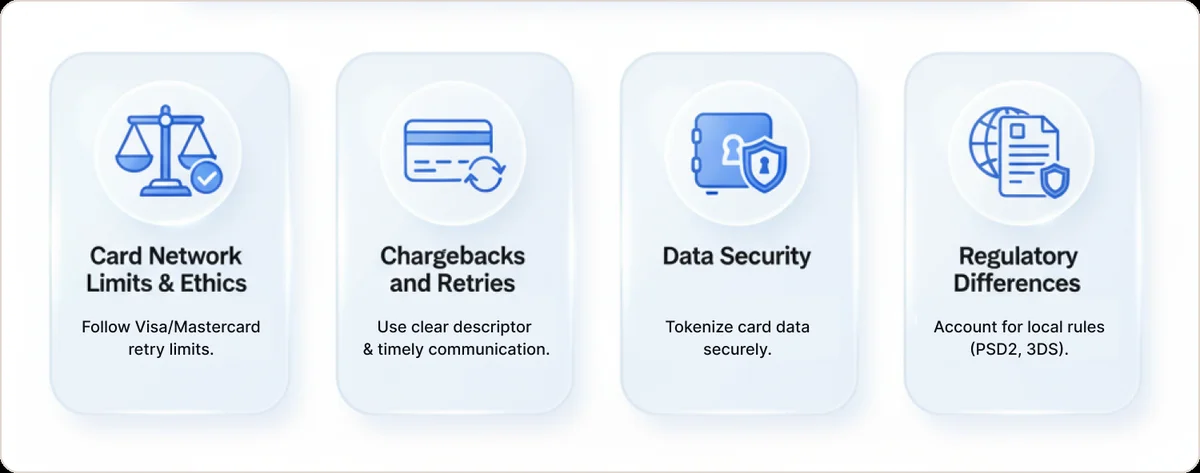
Card Network Limits & Ethics
Don't break rules trying to get your money. As detailed in Primer's guide to managing soft declines, Mastercard/Visa limits bear repeating—stay well under them. Ethically, don't attempt to charge customer indefinitely. If they're effectively gone, accept it to avoid potential disputes.
Chargebacks and Retries
If customer sees unexpected repeated charges, they might issue chargeback, which is worse. Ensure your descriptors are clear and communication is happening. If payment failure occurs multiple times, it may be better to proactively pause subscription and communicate, rather than keep trying for months.
Data Security
If implementing custom retry logic, handle customer card data securely (most will use tokens via gateway—safe). PCI compliance still applies if storing payment info for retries—use vaults/tokenization.
Regulatory Differences
Cross-border subscription billing often implies international transactions. Regulations like PSD2 (Europe) might require Strong Customer Authentication on retries (if initial attempt required it). Merchants should design retry flow in compliance—triggering 3DS challenge if needed on retry.
FAQ
Why do failed payments happen so often in subscription businesses?
Card-not-present subscription businesses often face stricter bank controls and higher fraud concerns, leading to more frequent declines. Banks may automatically decline transactions their models score as risky, or customers might have outdated payment info, so these industries see more payment failure incidents.
What is a smart retry for a failed payment?
A smart retry is a re-attempt of a failed payment timed or routed for better success. Instead of immediately retrying the same way, it waits for optimal conditions (like after payday for insufficient funds) or uses an alternate payment route to improve chances the payment goes through. Stripe's Smart Retries documentation provides detailed insights into how machine learning optimizes retry timing.
How many times should I retry a declined payment?
Generally 2 to 4 attempts, spaced out appropriately, is recommended for soft declines. Avoid excessive retries—card networks like Visa have limits (around 15 in 30 days) to prevent abuse. It's best to retry a few times with smart timing as part of your failed payment recovery process, then reach out to customer or try another payment method.
What's the best time to retry a failed payment?
Often within a day or two, ideally after factors causing failure may have resolved. For insufficient funds, retrying shortly after typical payday can help. The key is avoiding exact conditions of initial failure, so adjusting time of day or day of week can improve success and help prevent failed payments from becoming permanent.
Should I contact customers immediately when a payment fails?
Yes, but in a friendly, non-alarming way. Notify customer soon after failure, letting them know you'll retry and how they can help (update their card, etc.). Quick communication shows transparency and gives them chance to fix issue before service is impacted. This is crucial to effectively manage failed payments.
Can multiple payment gateways help recover failed payments?
Absolutely. If payment failure occurs on one gateway, an automatic retry on secondary gateway can often succeed. Many failed payments (around 7-8%) go through on second attempt with different processor. Using multiple gateways increases your chances of approval, especially useful for card-not-present transactions and recovering failed Stripe payments with backup options. Learn more about maintaining healthy MID configurations across multiple processors.
What is a hard decline vs. soft decline?
A soft decline is temporary issue—like insufficient funds, an issuer's system glitch, or exceeding spend limit. These might succeed if retried later. A hard decline is permanent failure for that payment method—stolen or canceled card, or hard block by bank. Hard declines won't succeed no matter how many retries you do; in those cases, seek new payment method from customer rather than retrying.
How do smart retries affect involuntary churn rates?
Smart retries can significantly reduce involuntary churn (customers unintentionally dropping off due to payment failure). By recovering payments that would have otherwise been lost, you keep those customers active. Businesses implementing smart failed payment recovery strategies (along with good dunning communications) often see their churn rate drop—in some cases, cutting involuntary churn by 50% or more when combined with other tactics.
Why does one retry policy leak the most recovery?
Because recovery odds swing hard by decline reason. Processing errors recover at 80-90% and insufficient-funds at 70-80%, but a generic 'card declined' recovers only 40-60%, and true hard declines at 0%. A single cadence over-retries dead codes and under-serves the recoverable ones, forfeiting revenue on the low-yield buckets.
When should I retry a failed subscription payment?
Fast, then aligned to when funds arrive. About 90% of recovered transactions occur within the first 10 days of a failed payment, so a slow or evenly-spaced cadence quietly loses revenue. Optimal retry days also differ by region: US on the 1st or 15th, Western Europe between the 25th and month-end, Australia on Thursdays.