Issuer Decline: Why Banks Reject Transactions and the Exact Playbook to Recover the Sale
Learn what causes an issuer decline, how to tell soft from hard declines, Visa retry rules, and the exact scripts and tools to recover failed payments fast.
What Is an Issuer Decline, and Why Does It Happen?
An issuer decline means the cardholder's bank, not your payment processor or gateway, rejected the transaction at the authorization stage. The bank sends back a numeric response code to indicate the reason, though issuers deliberately keep these codes vague to prevent fraud and card-testing abuse.
When a customer enters card details at checkout, your payment gateway forwards the authorization request to your acquirer, which routes it through the card network to the issuing bank. The issuer is the final decision-maker. Every other party in that chain is a messenger. If the issuer returns an issuer decline, the answer is no, regardless of what your gateway or processor does next.
I have seen merchants spend weeks troubleshooting their payment infrastructure when the problem sits entirely with the customer's bank. The gateway logs show an issuer decline. The processor cannot help. The merchant is left guessing. That confusion is preventable once you recognize that an issuer decline is a fundamentally different failure type from a gateway error or processor timeout, and each requires a different response.
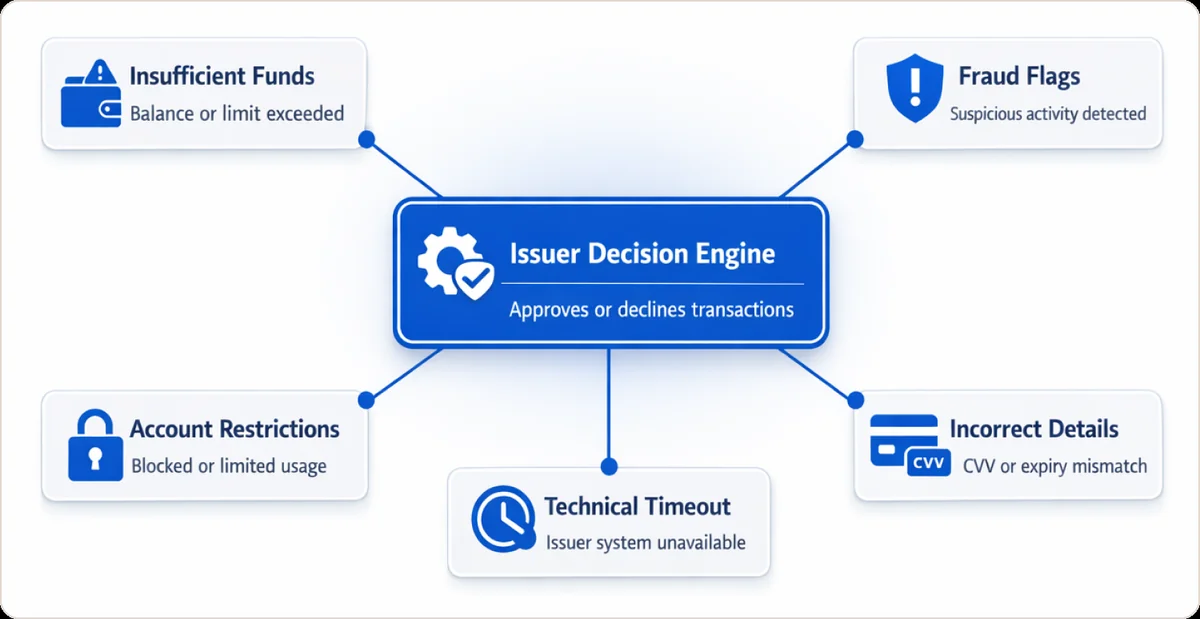
The most common reasons behind a card issuer declined payment:
- Insufficient funds or credit limit reached. According to Ethoca's research report, insufficient funds accounts for 44.4% (often rounded to 44%) of all issuer declines across card-not-present transactions.
- Fraud or risk flags. The issuer's scoring model flags unusual spend velocity, a mismatched billing address, or an unfamiliar merchant category.
- Incorrect card data. An incorrect CVV, an expired date, or an incorrectly formatted billing address triggers automatic rejection at the issuer level.
- Account restrictions. The card is frozen, closed, or blocked for specific transaction types such as international or online purchases.
- Technical timeouts on the issuer's side. Rare, but it happens during peak traffic. The response code differs from a standard issuer decline and should be treated as retriable.
Industry guidance and Visa response code documentation indicate issuers use generic declines like code 05 ('Do Not Honor') without specific reasons to prevent fraud exploitation, making it the most common yet least informative response.
For a full breakdown of response codes and their recommended merchant action, the credit card decline code reference covers each code with the correct handling action.
What Is the Difference Between a Soft Decline and a Hard Decline?
A soft decline is a temporary issuer decline that can be resolved through compliant retries, additional authentication, or customer action. A hard decline is a permanent issuer decline signaling that no further attempts should be made with that card.
Here is where most guides get this wrong: the base response code alone does not determine whether an issuer decline is soft or hard. The Visa category code attached to the response governs retryability. Code 05 (Do Not Honor) can be either a soft or hard issuer decline depending on whether the issuer has flagged it as "Do Not Try Again" in the category code field. Routing all code 05 responses the same way means you are misclassifying a significant portion of your issuer decline volume.
Soft issuer declines typically include:
- Insufficient funds, where the customer may have available funds later in the billing cycle
- Do Not Honor (05) without a "Do Not Try Again" category code, particularly in recurring billing contexts
- Issuer system unavailable or timeout responses
- Additional authentication is required, such as a 3DS challenge
Hard issuer declines include:
- Lost card (code 41) or stolen card (code 43) reported to the bank
- Card permanently blocked, account closed, or flagged as fraudulent
- Any issuer decline carrying a Visa "Do Not Try Again" or "Issuer Never Approves" category code
- Codes 5C (Blocked by cardholder) and 9G (Contact cardholder), both introduced in 2024 and 2025 and now appearing in gateway logs across Stripe and Braintree. Both are explicit hard stop signals. Do not retry either. Merchants who route 5C and 9G into soft-decline retry queues accumulate attempts against permanently blocked transactions, which fall directly under the Excessive Reattempts Rule.
A note on code 54 (Expired Card): unlike a stolen card issuer decline, an expired card credential can be refreshed automatically through Card Account Updater before the next billing attempt. Code 54 is a recoverable issuer decline for subscription merchants who have CAU enabled. The Card Account Updater guide covers implementation mechanics and the recovery lift merchants typically see.
How Should You Use the Decline Code to Decide What to Do Next?
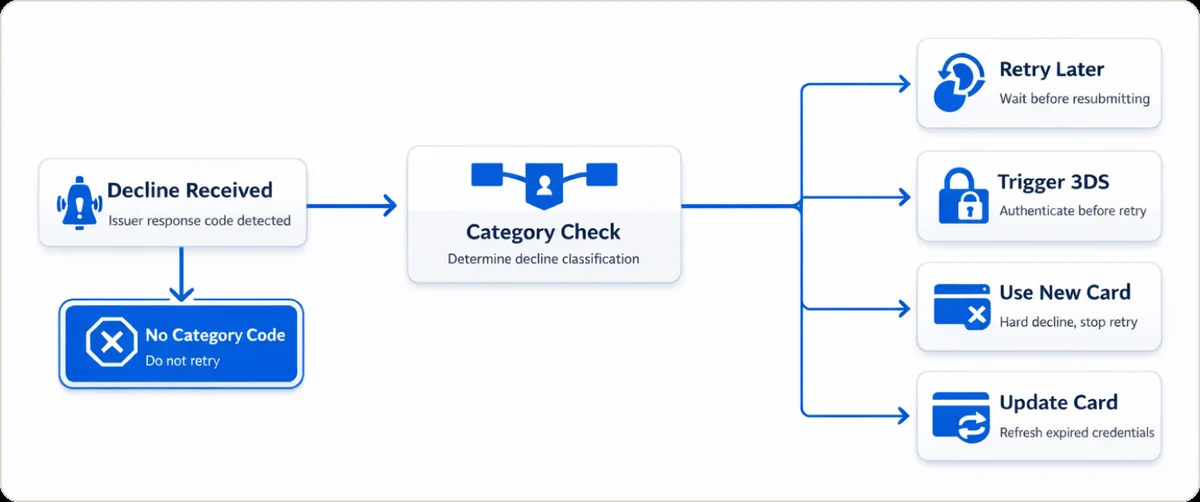
The issuer decline response code, combined with the Visa or Mastercard category code, tells you whether to retry, prompt the customer to act, or stop entirely. If no category code is present in the response, Visa's default position is not to retry.
Visa groups authorization response codes into categories under rules updated effective April 2021. These categories directly govern whether a merchant is permitted to resubmit an issuer decline. This is binding network policy, not advisory guidance.
The framework maps to four actions:
Retry with spacing (soft declines, codes 05 and 51): Wait at least 24 hours before resubmitting. Cap total attempts at 15 within a rolling 30-day window. Customer message: "Your bank declined this payment. Please try again or use a different card."
Trigger authentication (code 65, activity limit): Route through 3D Secure before retrying. Customer message: "Your bank needs to verify this payment. Please check your banking app."
Stop and request a new payment method (hard declines, codes 41 and 43): Do not retry. Present an alternative payment method immediately. Customer message: "This card cannot be processed. Please try a different card or contact your bank."
Stop and update credentials (code 54, expired card): Do not retry directly. Run the Card Account Updater to refresh the credentials before the next billing cycle. Customer message: "Your card details may be out of date. Please update your payment method."
The critical rule most merchant guides omit: if no category code is present in the issuer decline response at all, the Visa default is not to retry. Most merchants assume the opposite. That assumption is precisely what gets accounts flagged under the Excessive Reattempts Rule.
What Is Visa's Excessive Reattempts Rule, and Does It Apply to Your Business?
Visa's Excessive Reattempts Rule applies to all card-not-present transactions and limits merchants to 15 resubmission attempts per issuer decline within 30 days. Exceeding this threshold triggers non-compliance fees from the card network.
This rule applies to every CNP merchant in the US, including ecommerce stores, subscription businesses, and marketplaces. If your retry logic runs on a simple interval such as three attempts every 24 hours indefinitely, you may already be operating outside scheme compliance without knowing it.
Visa's April 2021 rules update, with subsequent April 2022 enforcement clarifications, defines the threshold clearly. Mastercard has parallel guidance that mirrors Visa's structure on issuer decline resubmission limits.
What compliant retry logic looks like in practice:
- For soft issuer declines: no sooner than 24 hours after the initial decline, no more than once per day.
- Cap total resubmission attempts at 15 within any rolling 30-day window, per card, per transaction.
- For any issuer decline carrying a "Do Not Try Again" category code: zero retries. Stop immediately.
- For subscription billing: space dunning attempts correctly and pair retry logic with Card Account Updater so stale credentials are refreshed before the next attempt rather than retried blindly.
Understanding how card scheme compliance rules apply to retry behavior is essential before modifying any custom retry configuration.
How Do You Retry Issuer Declines Without Triggering False Declines?
Not every decline is final. A retry that respects the payment retry strategies for each decline code recovers real revenue. Watching for a false decline protects good customers. Beast breaks declines down by decline code, issuer and merchant category code. This shows teams where the actual leak sits.
- Retry soft declines (insufficient funds, issuer unavailable) on a schedule tied to the code, not a fixed loop.
- Stop retrying hard declines (lost or stolen, do not honor) to avoid extra fees and dispute risk.
- Flag repeat declines on known-good customers as possible false declines, then route them differently.
What Should You Tell Customers When a Card Issuer Declines Payment?
When a card issuer declines payment, the customer message must remove blame, give one clear next step, and surface an alternative payment method before the customer closes the tab.
Most default error messages are not built for conversion. "Payment failed. Please try again." gives the customer nothing actionable. Baymard Institute's large-scale checkout usability research indicates that 4% of users abandoned their purchase when their credit card was declined (Source).
Most merchants skip the contrast between bad and good messaging. Here it is clearly:
Weak default:
Your payment was declined. Please try again.
Improved message for a soft issuer decline:
Your bank declined this payment. This is often a temporary hold or daily limit issue. Try again, use a different card, or contact your bank.
Improved message for a hard issuer decline:
This card cannot be processed. Please use a different payment method or contact your bank directly.
Follow-up email for failed subscription billing:
Hi [Name], your recent payment did not go through. This usually means your bank flagged the charge, or your card details need updating. Please update your payment method [link] or reply to this email, and we can help.
Support team macro:
I can see your payment was declined by your bank, not by us. We cannot override an issuer's decline on our end. I would recommend calling the number on the back of your card to get the specific reason. Alternatively, I can help you add a different payment method right now.
Present the alternative payment method at the exact moment the issuer's decline message appears. Every second of delay between "declined" and "here is another option" increases abandonment probability. The failed payment recovery guide covers the full dunning sequence, including timing, message cadence, and channel selection.
How Can You Reduce Issuer Declines Long Term?
You can structurally reduce issuer declines through network tokenization, Card Account Updater, checkout data quality improvements, and intelligent payment routing. Each lever addresses a different root cause of issuer decline volume.
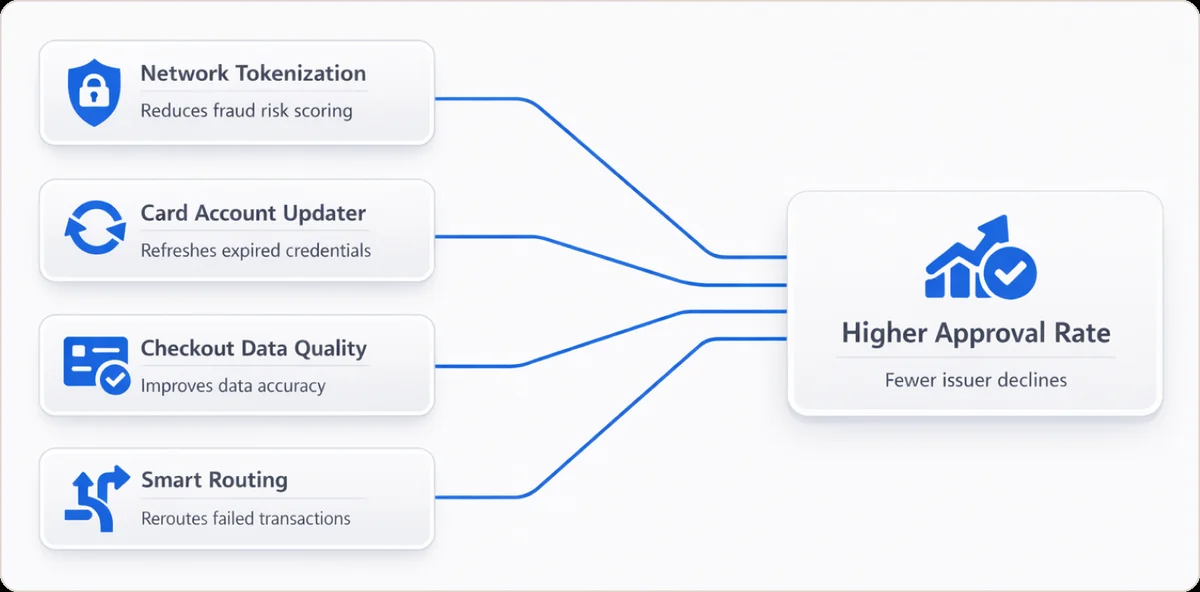
Network tokenization replaces raw primary account numbers with network-issued tokens that remain valid even when a physical card is reissued. Visa and Adyen's joint case study reports that merchants implementing EMV network tokens saw an authorization‑rate uplift of 2 to 7 percent, with U.S.‑specific data showing an average uplift of 4.74 percent. The issuer recognizes the token as belonging to a verified device and merchant combination, which lowers the fraud risk score and reduces the probability of an issuer decline on every subsequent transaction.
Card Account Updater automatically refreshes stored card credentials when a card is reissued or the account number changes. For subscription merchants, this is the highest-ROI tool for reducing issuer declines caused by expired or changed card numbers. Stripe's published documentation confirms that CAU directly reduces failed recurring payments from outdated credentials.
Checkout data quality is underestimated as an issuer decline lever. A mismatched billing address, missing CVV, or incorrectly formatted postal code raises the issuer's fraud risk score and increases the likelihood of an issuer decline. Ensuring your checkout captures and transmits complete, correctly formatted card data eliminates a category of issuer declines that has nothing to do with the customer's account status.
Multi-acquirer routing gives you the ability to reroute a transaction through a different acquirer when one path produces an issuer decline, improving overall approval rates without requiring any customer action. The multi-acquirer strategy guide explains when routing makes sense and how to implement it across your acquirer relationships.
Conclusion: Make Every Issuer Decline a Decision, Not a Dead End
Issuer declines are a permanent feature of the payment landscape. The issuing bank has final authority over every authorization, and that will not change. What can change is how precisely your operation responds. Most merchants lose recoverable revenue not because they cannot recover from an issuer decline, but because they have no system for distinguishing what is recoverable from what is not.
The practical starting point: pull your top 10 issuer decline response codes from the last 30 days and sort by volume. Identify which carry category codes, which are soft and retriable, and which are hard stops. That single audit reveals more about your payment health than most dashboards do. Then address each bucket with the right tool: smart retries for soft issuer declines, Card Account Updater for expired credentials, network tokenization for recurring billing, and alternative payment method prompts for hard issuer declines at checkout.
A 1 to 2 percent improvement in authorization rate is not a marginal gain. At meaningful transaction volume, it is a material revenue number, and the tools to achieve it exist today.
To see where your issuer decline mix stands and what recovery is realistically achievable for your transaction profile, the optimize payment routing solution is the right starting point. If recurring billing failures are the specific problem, recover failed payments covers the end-to-end dunning and retry system.
FAQ
What is an issuer decline in payments?
An issuer decline is a rejection sent by the cardholder's bank during the authorization stage. The issuing bank, not the merchant, acquirer, or processor, holds sole authority over whether a transaction is approved or returned as an issuer decline.
What does "card issuer declined payment" mean?
A card issuer declined payment message means the customer's bank reviewed the authorization request and rejected it. The most common reasons are insufficient funds, suspected fraud, incorrect card data, or bank-placed account restrictions.
What is a generic issuer decline?
A generic issuer decline is a non-specific rejection, most often response code 05 (Do Not Honor), where the issuing bank declines without providing a detailed reason. Issuers use generic codes intentionally to prevent bad actors from identifying fraud thresholds or card limits through systematic card testing.
What does "denied due to issuer decline" mean?
"Denied due to issuer decline" confirms the rejection originated with the cardholder's bank, not the payment processor or gateway. The merchant cannot override an issuer decline. The customer must contact their bank directly or provide a different payment method.
What is an issuer declined MCC?
An issuer declined MCC occurs when the cardholder's bank blocks transactions for a specific Merchant Category Code. Banks restrict certain cards from being used at particular business types, including gambling, adult content, and cryptocurrency, either by default policy or at the cardholder's direct request.
Can a card issuer decline be retried successfully?
Yes, many soft declines clear on a later attempt. Match the retry timing to the decline code and card issuer. Do not guess. Beast breaks recovery and declines down by decline code, issuer, BIN and billing cycle. A BIN is the bank identification number, the first digits of the card. This lets you retry the payments worth retrying. You leave hard declines alone.
What is a false decline, and how is it different from an issuer decline?
A false decline is a legitimate payment that the card issuer wrongly rejects. The issuer often reacts to risk signals rather than real fraud. The payment still returns an issuer decline code. Beast breaks declines down by issuer, BIN and card brand. A BIN is the bank identification number, the first digits of the card. This helps you spot patterns where good customers get blocked. You can then act on them.
Why does a card issuer decline a subscription rebill that approved last month?
Issuers score every authorization from scratch. A card that cleared last cycle can decline this cycle. A credit limit change, a new fraud rule, or stale card credentials each cause that. Beast splits declines by issuer, BIN (bank identification number, the first digits of a card), and billing cycle. You see which cycle and which bank leaks revenue.
How do you find out which issuers decline the most of your payments?
Group authorization results by issuer and BIN. One blended approval rate hides the problem. Beast splits recovery, declines, and disputes by decline code, issuer, BIN, and billing cycle. It also splits them by gateway or MID (merchant ID, the account your processor assigns your business), acquirer, and card brand. You see which banks decline you most. You then fix the actual leak.