Credit Card Decline Code: The 2026 Merchant's Guide
Master credit card decline codes. Codes 05, 51, and 54 cause 60% of failures. Learn soft vs hard declines, smart retry strategies, and recovery tactics.
Your customer's card just declined. You lost a $500 sale because you got "Code 05" on your terminal, and you have no idea what that means or whether you should try again.
I've processed over $2 billion in card transactions, and I'll tell you what nobody else will: most merchants lose 10-15% of revenue to preventable payment declines. Not because the customer can't pay. Because merchants don't understand the diagnostic signals their payment processor is sending them.
According to PYMNTS Intelligence's 2023 study Fraud Management, False Declines and Improved Profitability, 11% of eCommerce transactions failed in the last year, yet most merchants lack clear visibility into why (e.g., 82% in related findings on failure tracking). That's billions in lost revenue.
This guide shows you exactly what each credit card decline code means and what to do when you see it.
Quick Answer
Credit card decline codes are two-digit numeric messages from issuing banks explaining payment authorization failures. Code 05 (Do Not Honor) means the bank refused without details; try another card. Code 51 (Insufficient Funds) means retry later or offer payment plans.
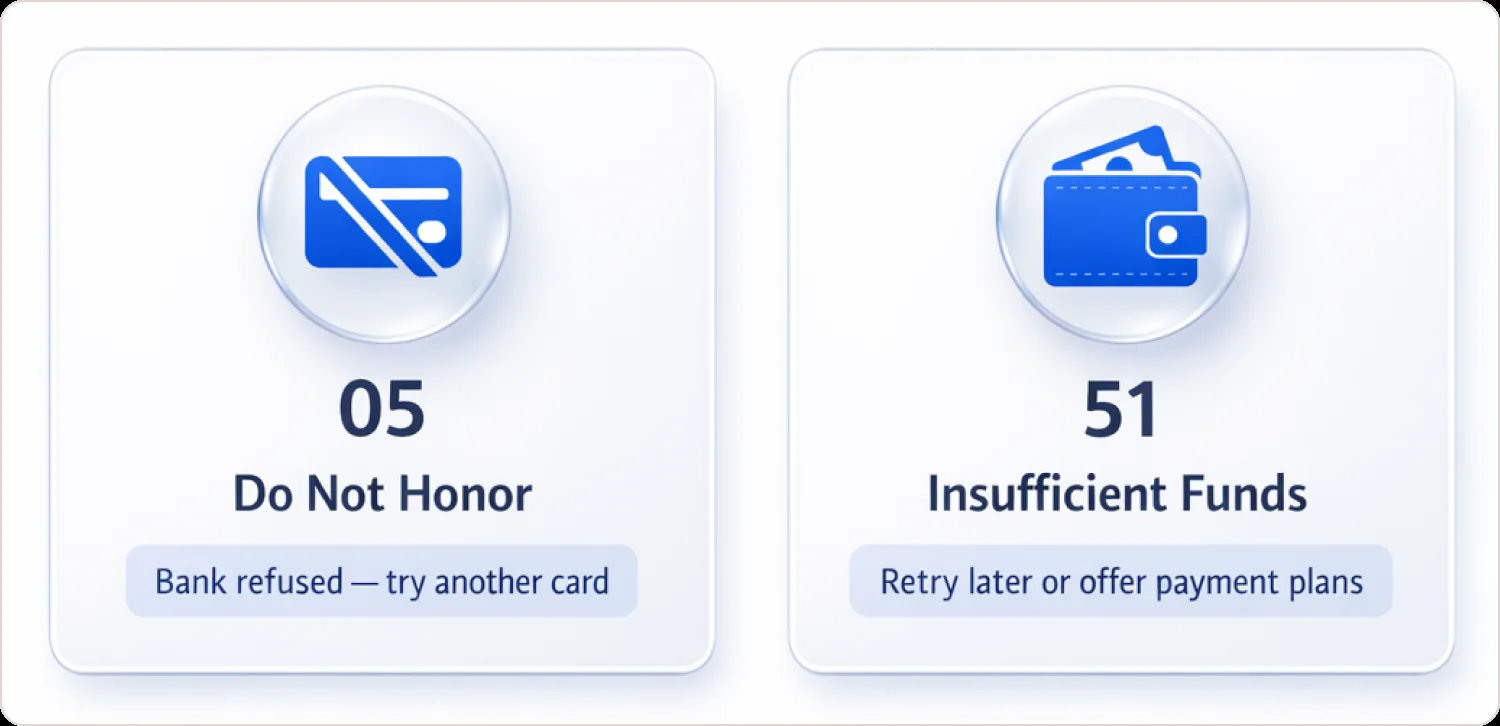
Quick Reference: Top 7 Decline Codes
| Code | Meaning | Action |
|---|---|---|
| 05 | Do Not Honor | Try different card; customer contacts bank |
| 51 | Insufficient Funds | Retry in 3-7 days or offer payment plan |
| 54 | Expired Card | Request updated card information |
| 14 | Invalid Card Number | Re-enter card details carefully |
| 43 | Stolen Card | Never retry—request different payment |
| 91 | Issuer Unavailable | Wait 30 minutes and retry |
| 59 | Suspected Fraud | Customer must verify with bank first |
What to Do RIGHT NOW When You Get a Decline
When you receive a payment declined message, follow this decision tree:
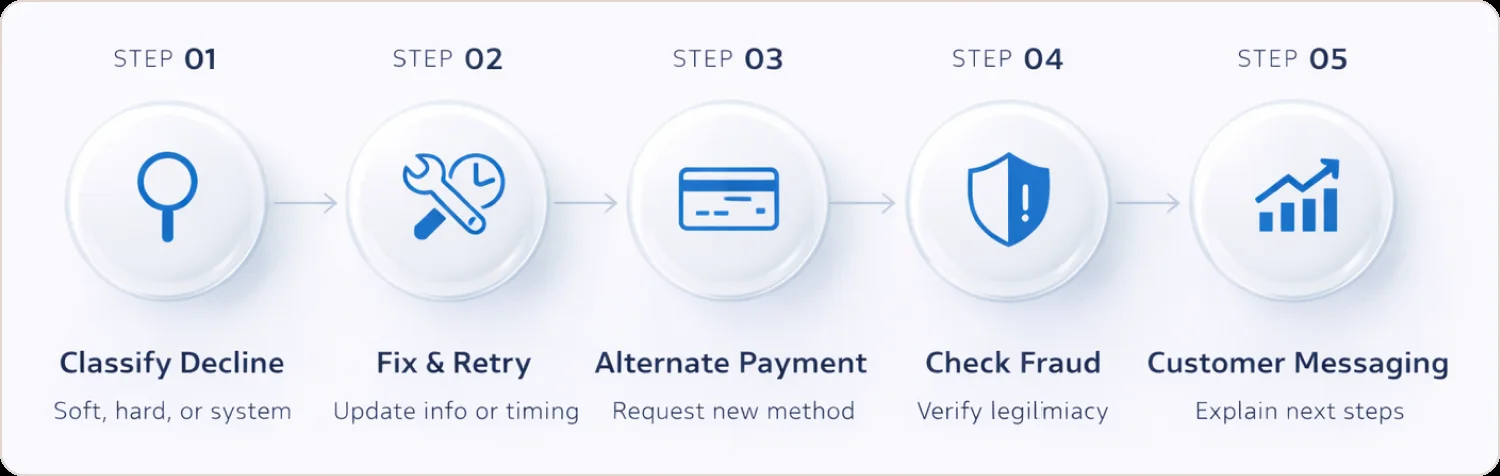
Step 1: Check if it's soft or hard
First, look at the specific code or message. Don't treat all declines the same.
- Is it soft or hard? (See the categorization above)
- Is it customer-fixable? (Expired card, insufficient funds)
- Is it merchant-fixable? (Configuration, format error)
- Is it a temporary system issue? (Issuer unavailable, network error)
This determines everything that follows.
Step 2: For soft declines, fix and retry
For soft declines, identify what can be fixed:
- Expired card? Ask customer for updated info
- Insufficient funds? Wait 24-72 hours and retry (for subscriptions)
- System error? Retry immediately
- Issuer unavailable? Wait 15-30 minutes
- Daily limit? Customer needs to contact their bank
Many payment platforms offer smart retry logic that automatically handles this. If you're processing subscriptions, configure retry schedules: immediate retry for technical errors, 3-day retry for insufficient funds, 7-day retry as a final attempt.
Step 3: For hard declines, request alternative payment
For hard declines, retrying the same card accomplishes nothing:
- Request a different payment method
- For stolen/lost cards (43, 41), never retry
- For Do Not Honor (05), customer should contact their bank first
- For expired cards (54), you need updated info
According to Mastercard's Ethoca division research, insufficient funds alone account for 44% of all payment decline codes.
Step 4: Communicate clearly with your customer
This is where most merchants fail. Instead of a generic "Transaction declined" message, give useful guidance:
Bad message: "Your payment was declined. Please try again."
Good message: "Your bank declined this charge due to insufficient funds (Code 51). You can try a different card, or contact your bank to make funds available. We're happy to hold your order for 24 hours."
Better message (for suspected fraud): "Your bank flagged this transaction as potentially unusual. This sometimes happens with new merchants or larger purchases. Please contact your bank at [number on back of card] to verify this purchase, then we'll retry the payment."
For email/customer service follow-up:
- Explain the likely reason in plain English
- Don't make the customer feel embarrassed
- Offer clear alternatives
- Provide your contact info for help
I've recovered sales just by being helpful and understanding about declines. Customers appreciate transparency.
Step 5: Document patterns
Track your declines over time:
- Which codes appear most frequently?
- Are certain issuers declining more than others?
- Do declines spike at certain times or for certain amounts?
- Are fraud declines (59, 63) unusually high?
If you see patterns:
- Many Code 05 declines from one bank? They might be flagging your MCC as high-risk
- Lots of CVV mismatches? Check if your checkout form is confusing
- High rates of Code 58? Your merchant account configuration needs review
Your payment processor should provide decline analytics. Use them. I've helped clients reduce decline rates by 5-10% just by identifying and fixing systemic issues. Approval rate drop analysis helps you spot these trends before they kill revenue.
Understanding Soft vs Hard Declines
The difference between soft and hard credit card decline codes determines whether you retry or move on.
Soft Declines: Temporary Issues
Soft declines mean the authorization failed due to a resolvable technical or temporary issue. The issuing bank didn't explicitly refuse the transaction; something in the processing chain broke.
Common soft decline codes:
- Code 51 (Insufficient Funds): Customer can add money and you retry
- Code 91 (Issuer Unavailable): Bank's system is temporarily down
- Code 96 (System Malfunction): Processing error, not customer problem
- Code 61 (Exceeds Limit): Daily transaction cap reached
- Code 65 (Activity Limit): Too many transactions in time window
For soft declines, implement payment retry strategies that space attempts intelligently. For recovery that runs automatically across every processor, with each recovered payment individually attributed, see failed payment recovery. I've seen merchants recover 15-20% of initially failed payments by retrying Code 51 declines after 72 hours.
If you would rather buy the retry logic than build it, our roundup of the best failed payment recovery software compares the options on mechanism and price.
Hard Declines: Permanent Refusals
Hard declines mean the issuing bank definitively rejected the transaction. The card itself has a problem that won't resolve with time.
Common hard decline codes:
- Code 05 (Do Not Honor): Bank refused, no explanation given
- Code 43 (Stolen Card): Card reported stolen—fraud concern
- Code 41 (Lost Card): Card reported lost by cardholder
- Code 54 (Expired Card): Past expiration date
- Code 14 (Invalid Card Number): Card number doesn't exist
- Code 59 (Suspected Fraud): Issuer's fraud system flagged transaction
Retrying hard declines wastes processing fees and annoys customers. Worse, some acquirers monitor excessive retry attempts as part of card scheme compliance requirements.
Major Decline Categories and What They Mean
Insufficient Funds and Account Issues
What causes Code 51 (Insufficient Funds)?
Code 51 indicates that the customer's account balance or available credit limit cannot cover the transaction amount. For debit cards, the checking account lacks funds. For credit cards, the purchase would exceed the credit limit.
This is the most common payment declined scenario I see. According to research cited by Stripe's documentation, insufficient funds represent the largest single category of payment authorization failures.
What actually works:
- Offer split payments across multiple cards
- Enable buy-now-pay-later options (Klarna, Affirm)
- For subscriptions, retry after 3 days, then 7 days
- Suggest the customer move funds or use a different card
Code 61: Exceeds Withdrawal Limit
The purchase exceeds the card's daily transaction limit. Debit cards frequently have $500-$1,000 daily caps that customers forget about.
Solution: Ask customer to contact their bank to raise limits, or split the transaction across multiple days.
Card Status Problems
Code 54: Expired Card
The card's expiration date has passed. This crushes subscription businesses that store payment methods.
Solution: Implement account updater services. Visa Account Updater and Mastercard Automatic Billing Updater automatically fetch new card data when customers receive replacement cards. This alone reduces expired card declines by 30-40%.
Code 43: Stolen Card / Code 41: Lost Card
The cardholder reported the card stolen or lost, and the issuing bank immediately blocked it.
Critical rule: Never retry these payment decline codes. Request a completely different payment method. For Code 43 specifically, you might be dealing with actual fraud.
Code 57: Transaction Not Permitted
The issuing bank restricted this card from this transaction type. Common scenarios:
- Business credit card used for personal purchase
- Card blocked from international transactions
- Card not authorized for gambling or cryptocurrency merchants
Solution: Customer must use a different card or call their bank to lift restrictions.
Security and Verification Failures
Code N7/97: CVV2 Mismatch
The three-digit security code doesn't match the issuing bank's records. Different processors use different codes for this (Stripe uses "incorrect_cvc" as their proprietary message).
What to do: Ask customer to re-enter CVV carefully. After 2-3 failures, treat as potential fraud. Never store CVV codes—that violates PCI DSS compliance standards anyway.
Code 59: Suspected Fraud
The issuer's fraud scoring system flagged the transaction as potentially fraudulent based on purchase patterns, geographic mismatches, or behavioral signals.
Solution: The customer must contact their bank to verify the purchase. 3D Secure authentication reduces these false positives by adding cardholder verification steps that satisfy issuer fraud systems.
Code 63: Security Violation
A catch-all for various security check failures, including CVV, AVS (address verification), or velocity checks.
Solution: Verify all submitted data accuracy. If this happens repeatedly, contact your processor to review fraud filter settings.
Technical and Processing Errors
Code 05: Do Not Honor
This is the most frustrating credit card decline code because the issuing bank refused the transaction without providing details. It's their catch-all for "we don't want to approve this, and we're not explaining ourselves" response.
Code 05 often indicates the bank's internal risk scoring flagged the transaction, the cardholder has dispute history with your merchant category, or the bank simply doesn't trust the transaction for undisclosed reasons.
What to do:
- Treat as hard decline initially
- Ask customer to contact their bank for explanation
- Try different card
- Never retry repeatedly—this triggers fraud systems
If you see patterns of Code 05 from specific issuing banks, they may have flagged your merchant category code as high-risk.
Code 91: Issuer Unavailable
The card network couldn't reach the issuing bank's authorization system. The bank's servers are down or unreachable.
Solution: Wait 15-30 minutes and retry. This is definitely soft. If urgent, try routing through the backup processor if you have payment routing optimization configured.
Code 96: System Malfunction
Something in the payment processing chain broke—could be issuer, network, or gateway.
Solution: Retry immediately. These usually resolve on second attempt. If persistent, contact your payment processor.
Code 12: Invalid Transaction
The transaction format or type couldn't be processed. This might be an unsupported transaction type or an incorrectly formatted authorization request.
Solution: Verify transaction type and currency formatting. Often, a simple retry fixes transient Code 12 issues.
Complete Decline Code Reference
| Code | Response Message | Type |
|---|---|---|
| 00 | Approved | N/A |
| 01 | Refer to Issuer | Hard |
| 05 | Do Not Honor | Hard |
| 12 | Invalid Transaction | Soft |
| 13 | Invalid Amount | Hard |
| 14 | Invalid Card Number | Hard |
| 41 | Lost Card | Hard |
| 43 | Stolen Card | Hard |
| 51 | Insufficient Funds | Soft/Hard |
| 54 | Expired Card | Hard |
| 55 | Incorrect PIN | Soft |
| 57 | Transaction Not Permitted | Hard |
| 59 | Suspected Fraud | Hard |
| 61 | Exceeds Withdrawal Limit | Soft |
| 62 | Restricted Card | Hard |
| 63 | Security Violation | Hard |
| 65 | Activity Limit Exceeded | Soft |
| 75 | PIN Tries Exceeded | Hard |
| 78 | Blocked (First Use) | Soft |
| 91 | Issuer Unavailable | Soft |
| 94 | Duplicate Transaction | Soft |
| 96 | System Error | Soft |
| N7 | CVV2 Failure | Hard |
| R0/R1 | Stop Payment Order | Hard |
This covers approximately 95% of payment decline codes you'll encounter in daily processing.
How to Prevent Credit Card Declines
What strategies reduce credit card decline rates? Implement account updater services for expired cards, configure intelligent retry logic for soft declines, use fraud prevention tools to avoid false declines, offer multiple payment methods as backups, maintain updated payment processing infrastructure, and minimize merchant errors through validation and staff training.
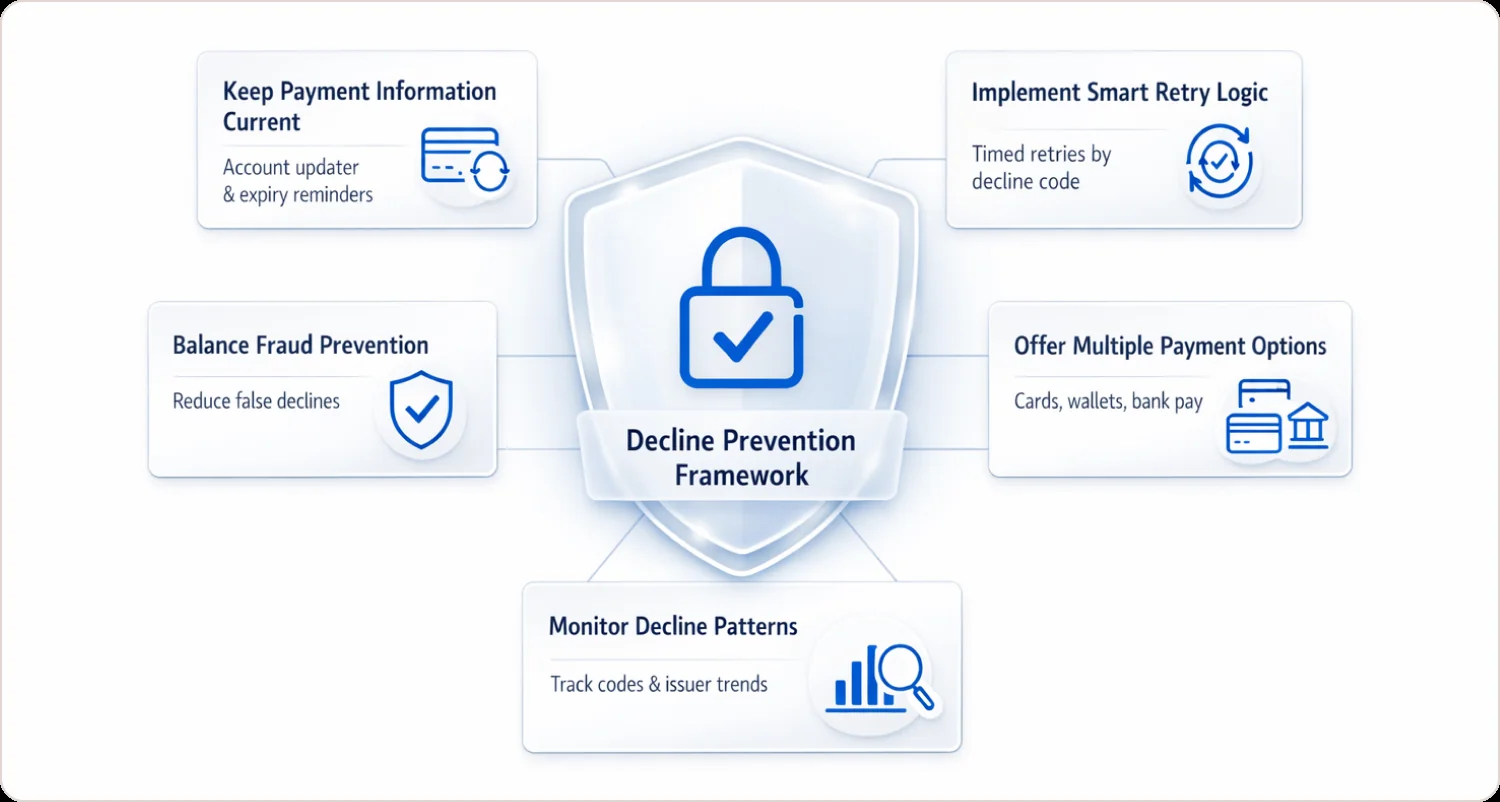
Keep Payment Information Current
Account updater services automatically fetch new card data when customers receive replacement cards. For subscription businesses, this prevents the majority of Code 54 (expired card) failures.
Send proactive renewal emails 30 and 15 days before stored card expiration dates with direct links to update payment information.
Implement Smart Retry Logic
Configure your billing system strategically:
- Code 91 (issuer unavailable): Retry after 30 minutes
- Code 51 (insufficient funds): Retry after 3 days, then 7 days
- Code 96 (system error): Retry immediately
- Never retry Codes 43, 41, 54 without updated information
Most subscription platforms (Stripe Billing, Recurly, Chargebee) include failed payment recovery automation built in.
Balance Fraud Prevention with Customer Experience
Anti-fraud tools reduce chargebacks but increase false declines. Merchants lose approximately 13 times more to false declines than actual fraud, per widely cited Javelin research (e.g., pre-2023 studies), with one estimate at $16.3 billion annually from 451 Research in 2021.
Enable AVS and CVV checks for card-not-present transactions, but tune sensitivity carefully. Chargeback alerts let you refund disputes before they become chargebacks, reducing your risk score with card networks.
Offer Multiple Payment Options
Payment method diversification provides backup when primary cards fail:
- Accept all major card networks (Visa, Mastercard, Amex, Discover)
- Offer digital wallets (PayPal, Apple Pay, Google Pay)
- Provide ACH/bank transfer for larger purchases
- Consider buy-now-pay-later for high-ticket items
If a customer's credit card declines, having alternatives saves the sale.
Monitor Your Decline Patterns
Track which payment decline codes appear most frequently. If Code 05 spikes from specific issuing banks, they may be flagging your MCC. If CVV mismatches increase, audit your checkout form UX.
Visa Acquirer Monitoring Program compliance requires monitoring excessive authorization attempts. Staying below thresholds protects your processing relationship.
Real-World Inspired: Reducing Decline Rates
A mid-sized e-commerce merchant faced ~10-12% decline rates from expired cards and fraud flags, losing significant revenue (industry avg. impacts 6-10% of sales).
Implemented:
- Account Updater service (auto-updates expired cards, preventing 20-40% of declines)
- Retry logic for insufficient funds (e.g., Code 51) on 3/7-day schedules
- Optimized fraud thresholds to cut false positives
- Added PayPal as a backup payment option
Result: Decline rates fell to ~6-8% in months, recovering 2-5% of monthly revenue, aligning with Visa/Mastercard AU benchmarks.
Payment Routing Optimization: The Missing Piece
Most merchants treat payment processing as fixed infrastructure. Smart merchants optimize routing dynamically.
When you process a transaction, your payment gateway can route through multiple acquiring banks and card networks. Payment routing optimization automatically selects the path with the highest approval probability based on card BIN data, transaction amount, and historical performance.
According to industry benchmarks, dynamic routing improves authorization rates by 2-5 percentage points. On $10M annual volume, that's $200K-$500K in recovered revenue.
Frequently Asked Questions
What is the most common credit card decline code?
Code 51 (Insufficient Funds) accounts for approximately 44% of all payment declines according to Mastercard Ethoca research, making insufficient funds the single most common decline reason merchants encounter.
What does do not honor mean on a card?
Do not honor is the issuer refusing the charge without giving a reason. The do not honor decline meaning is deliberately vague: the bank has declined but will not say whether it was risk scoring, a spending control, or something about the account. Spelled do not honour outside the US, it is the same code.
Can a do not honor decline be recovered?
Sometimes. It is a soft decline, so a retry is permitted, but retrying immediately on the same path usually returns the same answer. Recovery comes from changing something the issuer sees: a different acquirer, an updated card credential, or a retry at a different time. Repeatedly hammering the same route is what triggers scheme retry limits.
What does decline 51 mean?
Decline 51 is insufficient funds. The card is valid and the account is open, there is simply not enough available balance at that moment. It is the most recoverable decline there is, because the balance changes on its own, which is why 51 decline code retries are usually scheduled around payday cycles rather than retried instantly.
What does CVV2 declined mean?
CVV2 declined means the three or four digit security code did not match the one the issuer holds. On a first purchase it usually means a typo or a stolen card number without the physical card. On a rebill it more often means the stored credential is stale, because a reissued card carries a new CVV2 even when the number looks unchanged.
What does denied due to issuer decline mean?
It means the refusal came from the cardholder's bank rather than from your gateway or acquirer. Your processor passed the transaction on, and the issuer said no. Which is why the fix is rarely in your checkout: it is in what the issuer sees at authorization. Our guide to issuer declines breaks the categories down.
How do you reduce false declines?
False declines are legitimate customers refused by risk scoring. You reduce them by giving the issuer more to trust rather than by loosening your own filters: network tokens instead of stored card numbers, correct MCC and merchant descriptor, consistent billing amounts, and authentication data where it is available. Our false decline guide covers the diagnosis.
What is a soft decline vs hard decline?
Soft declines are temporary authorization failures from network errors or insufficient funds that allow retry attempts. Hard declines are permanent bank refusals from stolen cards or expired cards, requiring different payment methods.
What is Code 05 Do Not Honor?
Code 05 is a generic bank refusal where the issuing bank declines the transaction without providing specific reasons, often due to internal risk scoring or cardholder dispute history.
How to reduce credit card decline rates?
Implement account updater services for expired cards, configure intelligent retry schedules for soft declines, balance fraud tools to avoid false positives, and offer multiple payment methods as backups.
Decline code vs chargeback code difference?
Decline codes occur before sale completion when banks refuse authorization. Chargeback codes occur after completed sales when customers dispute transactions and banks reverse payments.
Code 51 vs Code 05 difference?
Code 51 specifically indicates insufficient funds, allowing retry after customer adds money. Code 05 is a generic bank refusal without details, requiring different payment method or bank contact.
When do credit card declines hurt approval rates?
Excessive retry attempts on hard declines trigger Visa Acquirer Monitoring Program thresholds and can result in fines or processing account restrictions from card networks.