What Are Shopify Payments? Fees, Limits, and What Most Merchants Get Wrong
Shopify Payments is Shopify's built-in processor that eliminates transaction fees, but geography, product category, and chargeback exposure can lock you out entirely.
What Are Shopify Payments, and How Do They Differ From Other Gateways?
Shopify Payments is Shopify's native payment gateway, built directly into the platform and powered by Stripe's underlying infrastructure. That Stripe relationship matters more than most merchants realize. It means Shopify Payments inherits Stripe's global issuer connections, PCI DSS Level 1 certification, and machine learning fraud signals. It also means Shopify Payments follows Stripe's acceptable use policy, which is why certain product categories cannot access it at all (more on that below).
Unlike third-party gateways such as PayPal or Authorize.net, Shopify Payments is pre-integrated. Merchants do not need to configure API credentials, webhook endpoints, or separate merchant accounts.
When a merchant uses an external payment gateway on Shopify, Shopify charges an additional transaction fee on top of the gateway's own processing rate. That fee ranges from 0.5% to 2% depending on the plan. Shopify Payments removes that extra charge entirely, keeping only the standard card processing rate.
For growing stores, there are different compounds. A store processing $50,000 per month on the Basic plan pays $1,000 in additional transaction fees annually when using an external gateway. With Shopify Payments, that cost disappears.
For most merchants on a single Shopify store, Shopify Payments handles everything natively. Merchants running multiple storefronts or operating in markets where Shopify Payments is unavailable will need to evaluate third-party alternatives.
What Payment Methods Does Shopify Payments Actually Support?
Shopify Payments supports a broader range of Shopify payment options than many merchants realize, and the list continues to expand as consumer behaviour shifts toward digital wallets.
Supported Shopify payment methods include:
- Credit and debit cards: Visa, Mastercard, American Express, Discover, and JCB.
- Shop Pay: Shopify's accelerated checkout product that stores encrypted payment credentials and lets returning customers complete purchases with one tap.
- Apple Pay and Google Pay: One-touch mobile wallet transactions that bypass manual card entry.
- Buy Now, Pay Later: Shopify integrates with Shop Pay Installments (powered by Affirm) for eligible merchants in the United States and Canada.
- Local payment methods: In certain markets, Shopify Payments supports iDEAL (the Netherlands), Bancontact (Belgium), and other regional options.
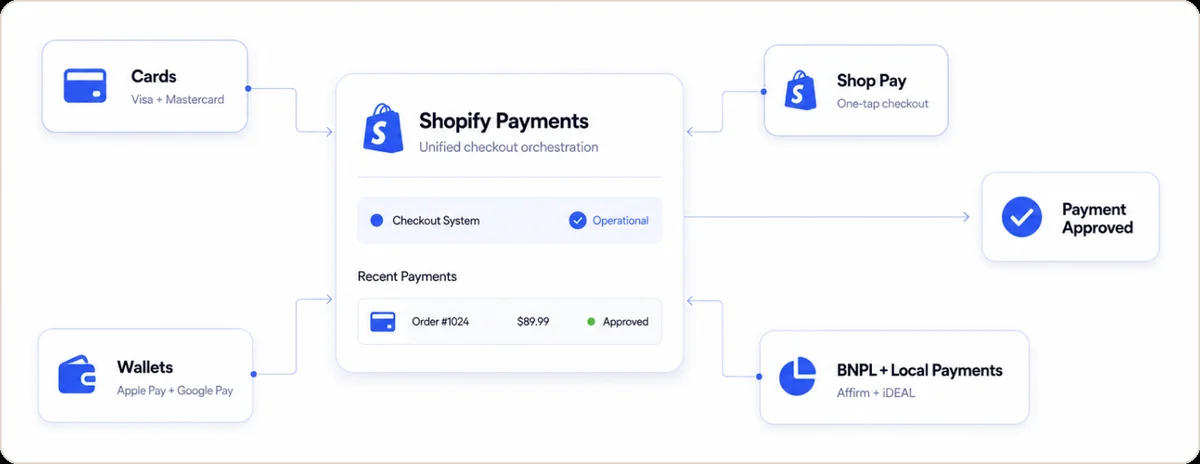
The one area where Shopify payment options feel limited is geography. Shopify Payments is only available in a fixed list of countries, currently around 20, including the United States, the United Kingdom, Canada, Australia, Germany, France, Ireland, and several others. Merchants outside those regions cannot access it at all and must rely on third-party gateways.
"Payments are infrastructure. In some markets, people trust credit cards, in others, they top up by phone or prepaid card." — from Tyler Cowen's podcast (2024)"
How Does Shopify Payments Work Behind the Scenes?
When a customer enters card details at checkout, Shopify does not store the raw card number on its servers. The card data is encrypted and tokenized immediately at the point of entry, then routed through Stripe's payment infrastructure to the card networks and issuing banks. Merchants never handle sensitive card data directly, which simplifies PCI compliance obligations significantly.
For subscription merchants or stores using card-on-file transactions, Shopify Payments stores encrypted card credentials in a secure vault. This vault supports automatic payment retries for failed transactions and powers Shop Pay's one-click checkout for returning customers.
The practical implication: when a card is declined, the failure is rarely a Shopify problem. It originates at the issuing bank level, based on fraud signals, available funds, or card status. Each decline code tells a different story, and knowing what triggered it determines whether a retry, a dunning email, or a different payment method is the right next move.
What Does Shopify Payments Cost Across Plan Levels?
Shopify Payments pricing is tied directly to the merchant's Shopify subscription plan. The higher the plan, the lower the per-transaction processing rate.
Shopify Payments Pricing Comparison (United States)
| Shopify Plan | Monthly Cost | Card Processing Rate (Online) | Additional Transaction Fee |
|---|---|---|---|
| Basic | $39/month | 2.9% + 30c | 0% (waived) |
| Shopify | $105/month | 2.6% + 30c | 0% (waived) |
| Advanced | $399/month | 2.4% + 30c | 0% (waived) |
| Plus | Custom pricing | Custom rate (from ~2.15%) | 0% (waived) |
In-person rates via Shopify POS are lower, starting at 2.7% on Basic. International card rates and currency conversion fees apply separately. Source: Shopify Pricing Page
To put the fee savings in concrete terms: a merchant on the Basic plan processing $20,000 per month through an external gateway pays an extra $400 per month (2% transaction fee) on top of whatever that gateway charges. Over 12 months, that is $4,800 in fees that Shopify Payments eliminates. At $50,000 per month, the savings reaches $12,000 annually.
A study commissioned by Shopify and conducted between December 2023–January 2024 found that merchants using Shopify's native commerce stack (including Shopify Payments) have up to 36% better total cost of ownership compared to merchants using fragmented third-party solutions. The average improvement was 33% better TCO.
Is Shopify Payments the Best Payment Method for Shopify Stores?
For most merchants in supported countries, yes. Shopify Payments is the best payment method for Shopify in terms of pricing, integration depth, and feature access.
There are real exceptions worth knowing before you start. Merchants in high-risk categories, such as CBD, firearms accessories, nutraceuticals, or adult content, frequently find that Shopify Payments will decline to support their account. Because Shopify Payments runs on Stripe's infrastructure, it follows Stripe's acceptable use policy. If your product category falls outside those terms, you will need a specialist processor before building your store's payment infrastructure.
Merchants processing more than $500,000 annually should also evaluate whether the Shopify Plus plan unlocks sufficiently lower rates to justify the upgrade. At that volume, a 0.2 to 0.5 percentage point difference in processing rate translates to $1,000 to $2,500 per year in savings.
According to Shopify's May 2023 checkout study ( conducted with a Big Three consulting firm), Shop Pay drives 50% higher conversion than guest checkout, and Shopify's overall checkout converts up to 36% better than competitor platforms.
How Do You Set Up Shopify Payments in Your Store?
Setting up Shopify Payments is a native flow inside the admin dashboard. There is no separate account application, no third-party portal, and no API credentials to configure.
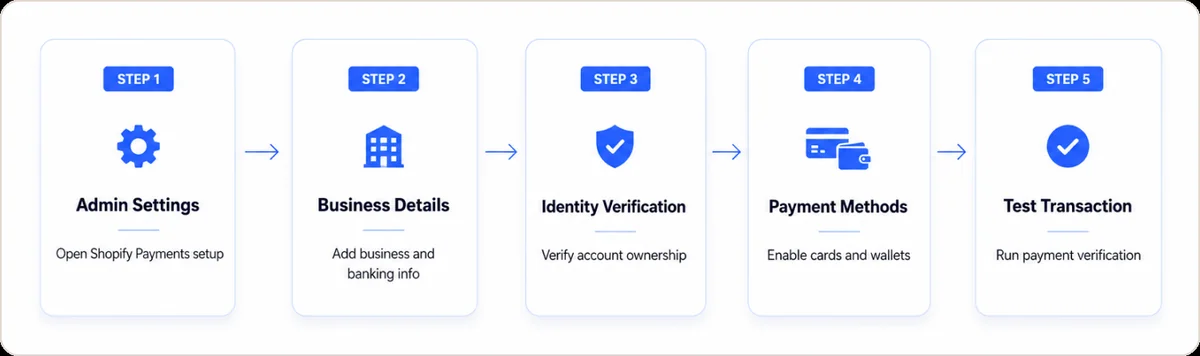
Step-by-step process to set up payment methods on Shopify:
- Log in to your Shopify admin and go to Settings, then Payments.
- Under "Shopify Payments," click Complete account setup (or Activate Shopify Payments if not yet enabled).
- Enter your business details, including business type, tax identification number, and banking information for payouts.
- Verify your identity as the account owner (required by financial regulations in all supported markets).
- Select which payment methods to enable. By default, Shopify activates Visa, Mastercard, Apple Pay, and Google Pay.
- Save settings and run a test transaction using Shopify's built-in test mode.
The entire process takes between 5 and 15 minutes for most merchants. Payout timelines are typically 2 business days after authorization in the United States, though this varies by country and merchant risk level.
One thing most setup guides do not mention: Shopify Payments can place a new account under review for anywhere from 24 hours to several business days. This happens most often with merchants who have a limited trading history, high average order values, or product categories that trigger an elevated risk flag. If your account goes into review, payouts pause until the review is complete. Building a backup gateway connection before you need it is a sensible precaution.
One decision worth making upfront is whether to enable Shop Pay Installments. This feature is opt-in and allows customers to split purchases into interest-free installments through Affirm. According to Shopify's internal merchant data (2024 Commerce Report), eligible merchants enabling installments report a meaningful increase in average order value on qualifying purchases, particularly for orders above $150.
If failed payments are already occurring in your store, our guide to failed payment recovery explains which retry strategies recover the most revenue without triggering fraud flags.
What Happens When Shopify Payments Have Limitations?
Shopify Payments limitations surface in three common scenarios. Each has a practical workaround.
Geographic unavailability. If a merchant's country is not on Shopify's supported list, the Shopify Payments option does not appear in the admin dashboard at all. The merchant must connect a third-party gateway, which reintroduces transaction fees. The most common alternatives are PayPal, 2Checkout, and regional processors specific to the merchant's market.
Account holds and reserves. If Shopify Payments flags an account for elevated chargeback risk or unusual transaction patterns, it may place a rolling reserve on a portion of payouts, typically 5% to 25% of sales held for 90 to 180 days. This is standard practice among payment processors, but it can create serious cash flow pressure if it happens without warning. Keeping your chargeback ratio below 0.5% is the most effective way to avoid this.
Currency limitations. Shopify Payments allows merchants to present prices in multiple currencies using Shopify Markets, but payouts are only issued in the merchant's bank account currency. Currency conversion fees apply when the sale currency differs from the payout currency. For high-volume cross-border merchants, these conversion costs can be material and may warrant opening local merchant accounts in key markets.
How Does Shopify Payments Handle Fraud and Chargebacks?
Shopify Payments includes a built-in risk-scoring system visible on every order detail page. It does not currently offer a guaranteed fraud protection product for merchants; Shopify discontinued its Fraud Protect guarantee program. What remains is the risk assessment layer, which flags orders as low, medium, or high risk based on machine learning signals.
The risk scoring evaluates device fingerprinting, shipping and billing address mismatches, email reputation, order velocity, and behavioral patterns. Merchants can configure automatic order cancellation or payment capture rules based on those risk scores.
Card-not-present fraud represents the fastest-growing category of payment fraud in the United States, accounting for nearly 73% of total card payment fraud losses (eMarketer, 2023). Shopify Payments addresses this through its integration with 3D Secure 2 (3DS2): when 3DS2 authentication completes successfully, chargeback liability shifts from the merchant to the issuing bank.
Shopify Payments does not offer chargeback representation or dispute management. When a chargeback is filed, Shopify provides evidence submission tools, but the merchant manages the dispute process manually. For merchants facing recurring chargebacks, our detailed guide to Shopify chargeback protection explains what Shopify covers, what it does not, and how to build a stronger dispute defense.
How Do You Monitor Shopify Payments Chargebacks Before They Trigger a Reserve?
Shopify shows disputes one order at a time, so patterns stay hidden. Monitoring covers two jobs. First, track your dispute ratio against card network programs like Visa's VAMP thresholds, the limits in the Visa Acquirer Monitoring Program. Second, group disputes by chargeback reason code, the code the card issuer assigns to each dispute. Beast Insights breaks disputes down by reason code, issuer, BIN (the first digits of a card, which identify the issuing bank) and MID (the merchant ID your processor assigns you). Teams then fix the actual leak. The Shopify integration reads your orders directly, so every dispute keeps the product and traffic source it came from.
- Ratio, not count. Card networks judge disputes as a percentage of monthly transactions, so a rising order volume can mask a worsening problem.
- Reason code mix. Fraud codes, product-not-received codes and subscription cancellation codes each point at a different team and a different fix.
- Issuer and BIN view. Disputes concentrated in one issuer usually point at authentication or descriptor problems rather than at your product.
- MID level view. Approval rate and dispute rate per MID show whether the pressure follows the processor or the offer, which is what Beast Insights surfaces by dimension.
Who Should NOT Use Shopify Payments?
Most guides only tell you when to use Shopify Payments. This is who should not.
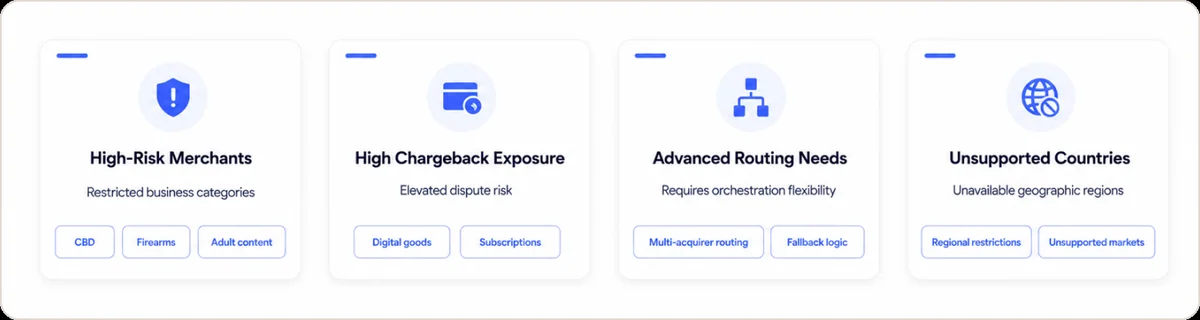
High-risk merchants. If your product falls under Stripe's restricted business list, Shopify Payments will either reject your account during setup or terminate it after an account review. Categories that consistently hit this wall include firearms and accessories, CBD and hemp products, nutraceuticals with health claims, subscription boxes in unregulated categories, and adult content. If you are in any of these verticals, do not build your payment stack around Shopify Payments as a primary processor.
Merchants with high chargeback exposure. If your business model generates chargebacks above 0.65%, Shopify Payments will eventually place your account on reserve or terminate processing. Merchants in digital goods, trial-based subscriptions, or high-return categories need to monitor their chargeback ratio actively and have a secondary processor ready before Shopify acts.
Merchants need advanced routing control. Shopify Payments does not offer granular transaction routing, fallback logic, or multi-acquirer redundancy. Merchants who have scaled past $1 million in annual GMV and want to optimize approval rates across multiple processors need a payment orchestration layer that Shopify Payments cannot provide natively.
Merchants outside supported countries. There is no workaround for geographic restrictions. If your country is not on the list, Shopify Payments is simply unavailable.
Conclusion: Should Your Store Use Shopify Payments?
For most Shopify merchants in supported countries, the decision is straightforward. Shopify Payments eliminates the transaction fee tax that external gateways impose, integrates directly with Shopify's checkout and fraud tooling, and requires no technical setup. If it is available in your country and your product category is not restricted, there is almost no scenario where an external gateway is cheaper on a total-cost basis.
The decision gets harder in three specific situations: you are in a restricted category, your chargeback rate is creeping above 0.5%, or you are scaling past the point where a single processor creates unacceptable concentration risk. In those cases, Shopify Payments becomes one component of a wider payment stack rather than the entire solution.
The most useful next step is to calculate the exact fee saving at your current monthly volume using the rate table above, then verify whether your product category falls within Shopify's acceptable use terms before you build your store's payment infrastructure around it.
Frequently Asked Questions
What is Shopify Payments?
Shopify Payments is Shopify's built-in payment processor that allows merchants to accept credit cards, digital wallets, and local payment methods directly through their Shopify store without connecting a third-party gateway.
How do Shopify payment methods differ from third-party gateways?
Shopify Payments eliminates the additional transaction fee that Shopify charges on orders processed through external gateways. Third-party gateways still work on Shopify but incur an extra 0.5% to 2% fee on every transaction.
What countries support Shopify Payments?
Shopify Payments is available in approximately 20 countries, including the United States, United Kingdom, Canada, Australia, Germany, France, Ireland, Spain, Italy, Japan, Singapore, New Zealand, and a growing number of others.
How do I set up payment methods on Shopify?
Navigate to Settings, then Payments inside the Shopify admin. Select Shopify Payments and complete the account setup flow, which requires business details, tax information, and a bank account for payouts.
What is the difference between Shopify Payments and PayPal?
Shopify Payments is the primary card processing layer for a Shopify store, handling Visa, Mastercard, and digital wallets natively. PayPal is a supplemental checkout option that many merchants add alongside Shopify Payments to accommodate customers who prefer paying through their PayPal balance or PayPal Credit. The two are not mutually exclusive and most merchants benefit from running both.
Can Shopify Payments be shut down without warning?
Yes. Shopify Payments can place an account on hold or terminate processing if it detects elevated fraud risk, excessive chargebacks, or a prohibited product category. Merchants who rely entirely on Shopify Payments without a backup processor are exposed to complete payment disruption if this happens. Having a secondary gateway connected and tested in advance is standard practice for any store processing meaningful volume.
What are Shopify Payments limitations for subscription businesses?
Shopify Payments supports recurring billing through Shopify subscription apps, but the card-on-file management, retry logic, and dunning workflows are controlled at the app level rather than at the processor level. Merchants running high-volume subscriptions typically need a dedicated dunning strategy on top of what Shopify Payments provides natively to recover failed payments before customers churn.
What is the best payment method for Shopify?
Shopify Payments is the best payment method for most merchants in supported countries due to zero additional transaction fees, deep platform integration, and access to Shop Pay's accelerated checkout. High-risk merchants and those in unsupported countries need to evaluate specialist alternatives.
How do you track Shopify Payments chargebacks by reason code?
Shopify's admin shows disputes order by order, so reason codes stay scattered. Export the disputes yourself, or feed the data into a platform that groups them. Group by reason code, issuer, BIN (the first digits of a card, which identify the issuing bank) and MID (the merchant ID your processor assigns you). Beast Insights groups disputes along each of those dimensions. Teams then see whether fraud, cancellation or fulfillment drives the volume.
Does using Shopify Payments protect you from Visa's VAMP thresholds?
No. VAMP, the Visa Acquirer Monitoring Program, is a card network program. Its thresholds follow your merchant account, whatever processor sits in front of it. Check your dispute ratio every month. Fix the top reason codes first. That work cuts your risk of landing in an enforcement tier.