

On this page
Key takeaways
- Every Shopify chargeback in the US triggers a $15 dispute fee. You only recover it if you win.
- A single $100 disputed order costs a merchant approximately $195.20 once you account for COGS, shipping, processing fees and customer acquisition costs.
- Prevention removes more chargebacks than dispute recovery. Fix your billing descriptor and shipping notifications first.
Who this helpsShopify store owners, e-commerce operators and subscription merchants losing revenue to payment disputes, card network fines or suspended Shopify Payments accounts.
One client, a DTC apparel brand doing $40,000 a month on Shopify, came to us after their Shopify Payments account was flagged for an elevated dispute rate of 1.1%. They were not selling fraudulent products. Their billing descriptor still showed the company's legal entity name. They had no tracking notifications configured past label creation. Their cancellation policy was buried in the footer.
Every one of those chargebacks was preventable. Within 60 days of fixing those three things, their dispute rate dropped below 0.6% and stayed there.
Chargebacks on Shopify are an operations problem wearing a payments mask. This guide covers what every store owner needs to know: what chargebacks actually cost, what the 2026 regulatory changes mean for your account, and the exact steps to prevent disputes and win the ones that do land.
What Is a Shopify Chargeback?
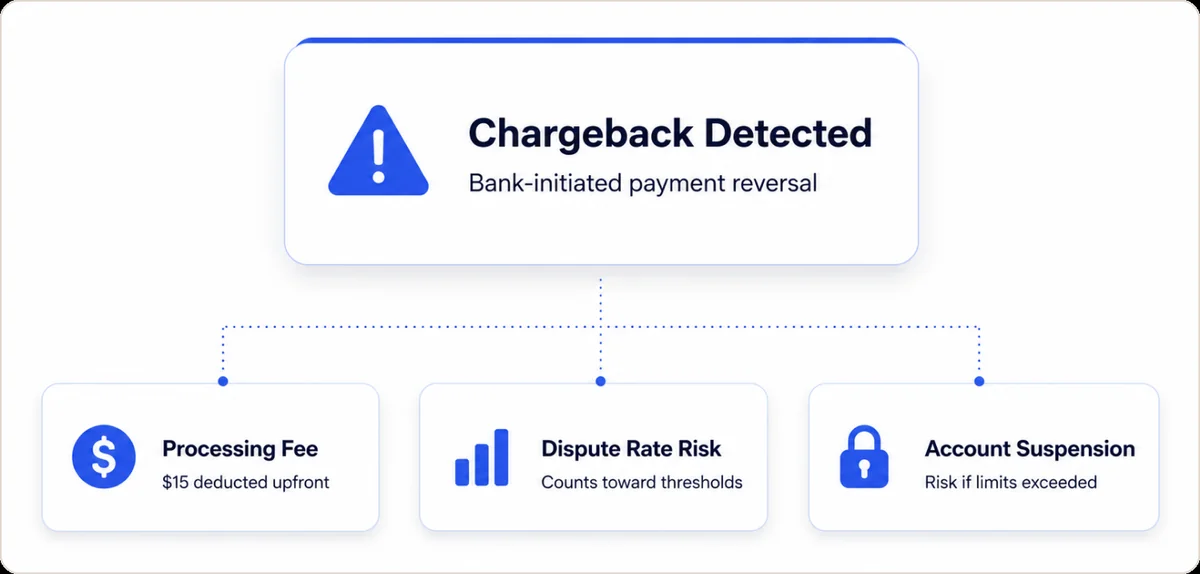
A Shopify chargeback is a payment reversal where a customer's card-issuing bank forcibly withdraws funds from your Shopify Payments account after the customer disputes a transaction. Unlike a refund, which the merchant controls, a chargeback bypasses you entirely. The bank acts first. You respond second, within a fixed window, with no guarantee of recovery.
When a customer pays through Shopify Payments, Shopify acts as the acquirer. The merchant absorbs 100% of the financial liability if the bank rules in the customer's favor, including lost inventory, shipping costs and a non-refundable processing fee on top of the order value itself.
Chargebacks also damage account health in ways refunds do not. A refund has zero effect on your dispute rate with Visa or Mastercard. A chargeback does. Accumulate enough disputes and Shopify may restrict or suspend your Shopify Payments account before a single network fine even applies. For the full difference between these two outcomes, the chargeback vs refund guide covers each scenario in detail.
Note: Shopify Payments is Shopify's native payment processor and is entirely separate from third-party gateways such as PayPal or Stripe. Chargebacks through third-party gateways follow that provider's own dispute process. This guide covers Shopify Payments chargebacks specifically.
How Much Does a Shopify Chargeback Really Cost?
Shopify charges a flat $15 dispute fee per chargeback in the United States, refunded only if you win. That number gets the attention. The actual damage does not show up in a single line item.
The table below shows the full cost of a single $100 disputed order. The $25 customer acquisition cost reflects average paid social CAC for DTC brands based on Shopify's own merchant benchmarks. The 40% COGS figure is a conservative industry average. Adjust both rows to your actual margins.
| Cost Component | Estimated Amount | Recoverable if Won? | Notes |
|---|---|---|---|
| Order value (revenue reversed) | $100.00 | Yes (if won) | Withheld by bank immediately on filing |
| Shopify dispute fee | $15.00 | Yes (if won) | Deducted at filing, not at ruling |
| Processing fee (Basic: 2.9% + $0.30) | ~$3.20 | No | Non-refundable regardless of outcome |
| Outbound shipping | ~$12.00 | No | Sunk cost not covered by a win |
| Cost of goods (est. 40% COGS) | ~$40.00 | No | Merchandise is rarely returned in disputes |
| Customer acquisition cost (paid social avg.) | ~$25.00 | No | Adjust to your actual CAC |
| Total estimated loss per $100 dispute | ~$195.20 |
At a 1% chargeback rate on 1,000 monthly orders averaging $100, that is $1,952 in monthly losses before a single card network fine applies. According to the Merchant Risk Council's 2025 Global eCommerce Payments and Fraud Report, merchants lose an average of $3.75 for every dollar of fraud face value once all indirect costs are included, a figure consistent with the breakdown above.
International fees follow the same logic. Shopify charges 15 EUR in the Eurozone and 15 GBP in the United Kingdom per dispute. The refund-on-win policy applies in all supported markets.
What Are the Shopify Payments Chargeback Reason Codes?
Every dispute arrives with a Shopify Payments chargeback reason code assigned by the card network. That code determines exactly what evidence you need to submit. Responding without reading it first is the single most common error merchants make.
The five most common codes, with an honest assessment of how winnable each one is:
| Reason Code | Network | What It Means | Winability | Primary Evidence Needed |
|---|---|---|---|---|
| 10.4 | Visa | Cardholder did not authorize the charge | Hard without CE3.0 data | Device ID, IP match, prior undisputed transactions |
| 4837 | Mastercard | No cardholder authorization | Hard | Signed delivery, IP and device fingerprint |
| 13.1 / C08 | Visa / MC | Item not received | Winnable with tracking proof | Carrier tracking with delivered status and timestamp |
| 13.3 | Visa | Item significantly not as described | Moderate | Product photos, original listing, customer service record |
| 13.2 | Visa | Cancelled recurring transaction | Winnable with clear terms | Cancellation policy shown at checkout, no cancellation request on file |
A 10.4 fraud dispute without device fingerprint data is nearly impossible to win. A 13.1 non-delivery dispute with a carrier scan showing delivered is almost always recoverable. The winability column drives the accept-versus-fight decision covered later. For the full code library and documentation requirements, see the chargeback reason codes reference.
What Are the 2026 Chargeback Rate Thresholds That Affect Shopify Merchants?
Shopify does not publish an official chargeback rate limit. Card networks do, and they enforce those limits through Shopify's acquirer relationship. Breaching them puts your ability to process payments at risk, not just your account standing.
The most significant 2026 change: Visa reduced its Visa Acquirer Monitoring Program (VAMP) threshold from 2.2% to 1.5%, effective April 1, 2026, across North America and Europe. For a detailed breakdown of how VAMP works and how to calculate your exposure, the Beast Insights Visa Acquirer Monitoring Program guide covers the full mechanics. Anything above 0.9% enters early warning territory under the revised rules.
| Program | Network | Warning Threshold | Fine Threshold | Fine Structure |
|---|---|---|---|---|
| VAMP | Visa | 0.9% of transactions | 1.5% of transactions | $4/incident (months 1-2), scaling to $16/incident by month 5 |
| ECM (Excessive Chargeback Merchant) | Mastercard | 1.0% and 100 chargebacks | 1.5% and 300 chargebacks | $1,000+ monthly; both rate AND volume must be met |
| Scam Merchant Monitoring | Mastercard | 3% combined refund + CB rate | 5% combined rate (new merchants, min 500 txns) | 72-hour investigation; possible processing block |
Mastercard Scam Monitoring, live July 24, 2026: Mastercard now requires acquirers, including Shopify Payments, to investigate any merchant whose combined refund and chargeback rate exceeds 5% in a rolling 30-day period with a minimum of 500 transactions.
Acquirers have 72 hours to verify legitimate business activity or face processing blocks on Mastercard and Maestro rails. This threshold includes ordinary product returns, not just chargebacks. Fashion and apparel merchants with standard 20 to 30% return rates need to monitor their combined rate closely.
How Does the Shopify Chargeback Process Work?
When a customer disputes a transaction with their bank, a fixed sequence follows. Missing the response deadline forfeits the dispute automatically with no appeal path.
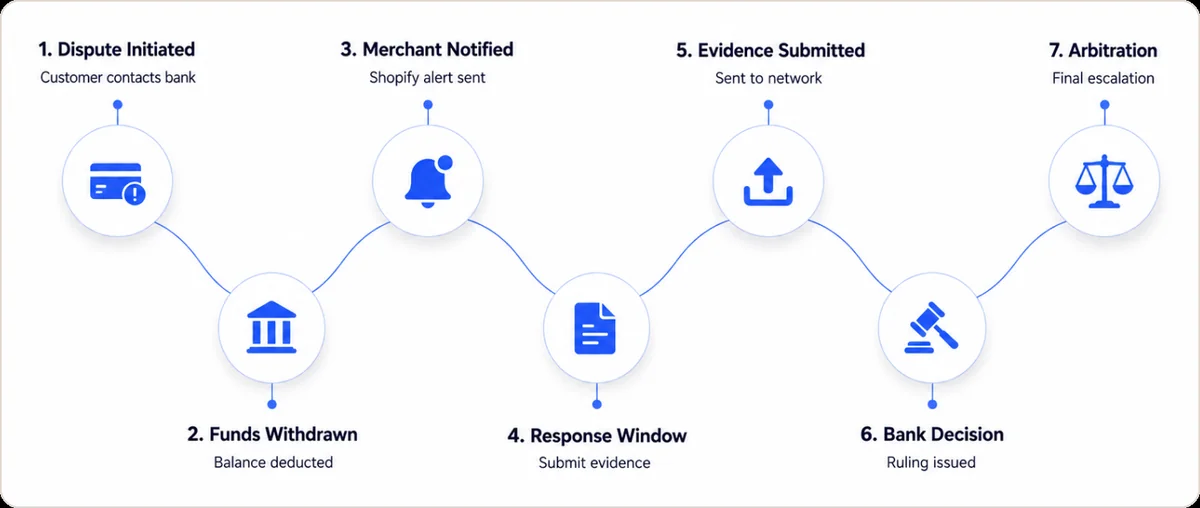
- Customer contacts their bank to dispute a charge. The bank issues a provisional credit to the cardholder immediately.
- Funds are withdrawn from your Shopify Payments balance. The bank does not wait for your input before removing the money.
- Shopify notifies you by email and in your admin under Orders, then Chargebacks. The $15 dispute fee is deducted at this moment, before the case is reviewed.
- Your response window opens. Visa disputes allow 7 to 21 days for evidence submission. Mastercard windows vary by reason code. The deadline is shown in your Shopify admin. Missing it closes the case against you with no recourse.
- Shopify submits your evidence to the card network as a single packaged PDF, up to 5MB. The merchant does not contact the bank directly.
- The bank issues a ruling, typically 30 to 75 days after submission. A win returns both the order funds and the $15 fee to your Shopify Payments balance.
- Arbitration is the final escalation. Visa arbitration costs $500. Only pursue it on orders where the recovery value clearly exceeds that fee.
Merchants who lose disputes they should have won almost always missed the deadline in step four. Set a calendar alert within the first hour of any chargeback notification. Treat it as a payment due date.
What Is Shopify Chargeback Protection and Does It Cover Your Store?
Shopify chargeback protection exists in two distinct forms with different coverage models, costs, and exclusions.
Shopify Protect, part of the Shop Pay checkout ecosystem, covers eligible orders automatically. If a covered order is disputed, Shopify reimburses the full order value and the $15 fee, no evidence submission required. According to Safe App's 2026 analysis of Shopify's internal data, Shop Pay's fraud screening reduces fraudulent dispute rates by approximately 20% for enrolled merchants.
Fraud Protect is a paid add-on for qualifying Shopify Payments merchants in the United States. It charges a per-transaction fee and covers the full chargeback amount on protected orders, activated at the product or collection level, not store-wide.
Neither product covers chargebacks filed as "item not received" or "item not as described." Neither covers friendly fraud under reason codes 10.4 or 4837, the most common dispute category on Shopify. For those, CE3.0-compatible device and IP data capture is your primary defense, covered in the next section.
How Do You Prevent Shopify Chargebacks Before They Are Filed?
Prevention is the only strategy with a genuine return on investment. Every dispute never filed costs nothing to win. The five tactics below are ranked by impact.
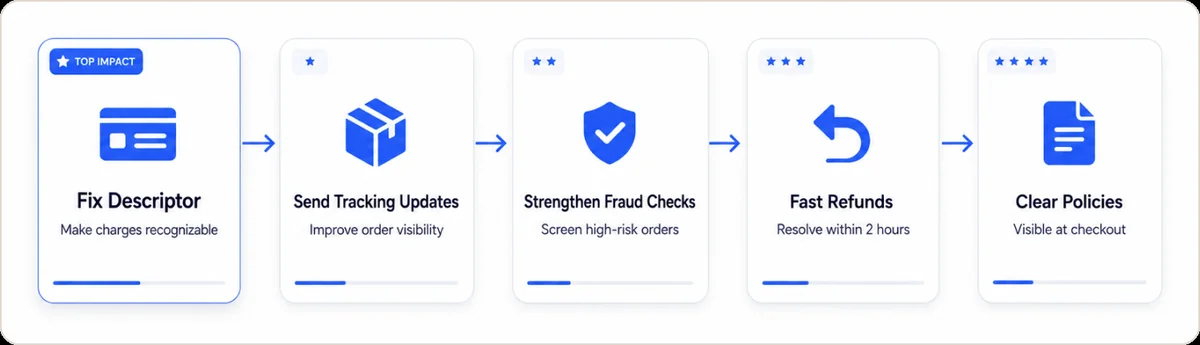
1. Fix your billing descriptor first. A significant share of "unauthorized transaction" disputes happens because customers do not recognize the charge on their bank statement. Update your billing descriptor in Shopify Payments settings to match your brand name, not your legal entity. This eliminates an entire category of disputes that have nothing to do with actual fraud.
2. Send tracking notifications at every fulfillment stage. Most "item not received" disputes happen when customers lose visibility after purchase. Shopify Flow can trigger automated notifications at label creation, carrier pickup, out-for-delivery, and delivery confirmation. Customers who can track their order in real time do not call their bank.
3. Tighten fraud screening for medium and high-risk orders. Enable Shopify's built-in fraud analysis and hold flagged orders for manual review before fulfillment. For stores processing more than 500 orders a month or selling high-AOV products, adding 3D Secure authentication to high-value orders shifts liability to the card issuer on approved transactions, which is a structural defense, not just a screening layer.
4. Process refunds within two hours of a complaint. Shopify advises merchants to process refunds within two hours to prevent a Visa fraud warning flag from attaching to the transaction. A fast refund avoids the $15 fee, protects your dispute ratio, and preserves the customer relationship.
5. Display your policies where customers cannot miss them. Place refund, return, and cancellation policies at the checkout confirmation step, not just the footer. Make cancellation self-serve. Confusion at cancellation converts churn directly into chargebacks.
"The biggest mistake merchants make is treating chargebacks as a payments issue to be managed after the fact, rather than a customer experience failure to be prevented upstream." Monica Eaton, Founder and CEO, Chargebacks911 (Chargebacks911 Knowledge Base, 2025)
How Do Chargeback Alerts and Reason Codes Help You Stop Disputes Early?
Many Shopify chargebacks are friendly fraud. A real customer disputes a charge they made. Read the chargeback reason codes behind each case. Then use chargeback alerts to refund eligible orders before they harden into disputes. Beast breaks recovery, declines, and disputes down by decline code, issuer, BIN (the first digits of a card that identify the bank), and MID (your merchant account ID). This shows you the real leak to fix. On Shopify, the Shopify integration matches every alert and dispute back to the order, product and traffic source behind it.
- Match every dispute to its reason code so you attack the cause, not the symptom.
- Turn on network alerts (Visa RDR, CDRN, Ethoca) to refund eligible orders before they post.
- Watch renewals and billing cycles, a common friendly-fraud trigger for subscription businesses.
- Track approval rate and chargeback percentage per MID to spot the account that is leaking.
How Do You Win a Shopify Chargeback Dispute?
Winning requires submitting evidence that directly addresses the specific reason code before the deadline. Generic responses do not win. Reason-code-matched documentation does.
For fraudulent disputes (Visa 10.4 / Mastercard 4837): Proof of delivery to the billing address, the IP address captured at checkout, a device fingerprint or Device ID, the order confirmation email with an open or click timestamp, and any prior purchase history from the same account.
Under Visa's Compelling Evidence 3.0 framework, expanded in April 2026, you can submit two previous undisputed transactions from the same IP address or Device ID dated between 120 and 365 days before the current dispute. Merchants who do not capture and store Device IDs for a rolling 365-day window lose their strongest defense against friendly fraud.
For item not received (Visa 13.1 / Mastercard C08): Carrier tracking with a delivered status and timestamp, signature confirmation where applicable, and any customer message acknowledging receipt or requesting redelivery.
For product unacceptable (Visa 13.3): Product photos, a screenshot of your listing at the time of purchase, and any customer service exchange, especially one showing the customer contacted you before filing with their bank.
Submit everything as a single PDF under 5MB through the Shopify admin chargeback interface. A file that exceeds the limit fails silently while the deadline still expires. If you win, the reversed funds and the $15 fee return to your balance within a few business days. For a full walkthrough of evidence structure by reason code, see the chargeback representment guide.
Which Tools Help Manage Shopify Chargebacks in 2026?
The chargeback tool market splits into platforms that automate dispute recovery and platforms that prevent disputes from reaching the formal stage. The right choice depends on order volume, average order value and current dispute rate. For a side-by-side on a lean, subscription-friendly option, see our Disputifier comparison.
| App / Service | Best For | Pricing Model | Automates Evidence? | Category |
|---|---|---|---|---|
| Shopify Protect | Shop Pay eligible merchants, physical goods | Free, no opt-in required | Yes (covered orders) | Prevention + Recovery |
| Chargeflow | Scaled D2C brands, high dispute volume | Success-based, 25% of recovered | Yes, AI-generated packages | Recovery |
| NoFraud | High-AOV or high-risk categories | Per-transaction fee, varies by volume | Yes, with chargeback guarantee | Prevention |
| Disputifier | Small to mid-size, lean teams | Flat monthly subscription | Partial, template-based | Recovery |
| Safe App | Merchants wanting alert-based interception | Per-matched alert fee | No, alert only | Prevention |
Shopify Protect is the default starting point because it costs nothing. For stores under $500K in annual revenue, Shopify Protect combined with a manual review process on medium-risk orders covers most of the exposure. Above that volume, the economics of a success-based recovery platform or a guarantee-backed prevention tool are easy to justify against the $195.20 per-dispute real cost. If a success-based recovery platform is on your shortlist, weigh Beast Insights vs Chargeflow first. Verdivo is another Shopify-native, success-based option that charges a 25% fee only on won disputes; see how it stacks up in Beast Insights vs Verdivo, or scan the whole field in the best Verdivo alternatives roundup.
The Bottom Line
Shopify chargebacks are an operations problem. The $15 fee is the visible cost. The $195.20 real cost per dispute is what damages margins. The 1.5% Visa VAMP threshold and Mastercard's July 2026 scam monitoring program are what can end your ability to process payments altogether.
Start where the impact is highest: update your billing descriptor, activate Shopify Protect, configure tracking notifications at every fulfillment stage, and display your policies at checkout confirmation.
Those four changes eliminate the majority of preventable disputes. For disputes that do land, match your evidence to the reason code and submit before the deadline. That combination covers most of the chargeback risk for most Shopify stores.
FAQs
What is a chargeback on Shopify?
A Shopify chargeback is a forced payment reversal initiated by a customer's card-issuing bank, which withdraws funds from the merchant's Shopify Payments account without requiring merchant approval. Shopify deducts a $15 dispute fee at the time of filing, before any ruling is made.
Does Shopify refund the chargeback fee if I win?
Yes. Shopify refunds the $15 dispute fee if the merchant wins. The reversed order funds are also returned to the Shopify Payments balance. If the merchant loses, both the fee and the order amount remain with the customer.
How long does a Shopify chargeback take to resolve?
A Shopify chargeback typically takes 30 to 75 days to resolve after the merchant submits evidence. Merchants have 7 to 21 days from the notification date to respond, depending on the card network. The full timeline can extend to 120 days in arbitration cases.
What is a good chargeback rate for a Shopify store?
A dispute rate below 1% is considered healthy in 2026. Visa's VAMP program begins monitoring merchants whose rate exceeds 0.9% and applies per-incident fines once the rate crosses 1.5%. Shopify may suspend Shopify Payments access if a merchant consistently breaches these thresholds.
What is the difference between Shopify chargeback protection and Fraud Protect?
Shopify Protect automatically covers eligible Shop Pay orders at no cost to the merchant. Fraud Protect is a paid per-transaction add-on for qualifying US merchants, activated at the product or collection level. Shopify Protect is automatic; Fraud Protect is opt-in.
Can a Shopify chargeback lead to account suspension?
Yes. Shopify can suspend Shopify Payments access if a merchant's dispute rate consistently exceeds Visa or Mastercard network thresholds. Merchants in monitoring programs face escalating per-incident fines and risk losing payment processing access entirely if rates are not reduced within the remediation window.
How do I dispute a chargeback on Shopify?
Navigate to Orders, then Chargebacks in the Shopify admin, select the disputed order, compile evidence that matches the chargeback reason code, and submit the package as a PDF under 5MB before the deadline shown in the admin. Shopify forwards the evidence to the card network on the merchant's behalf.
Do chargeback alerts prevent Shopify chargebacks?
Alerts flag a dispute before it becomes a formal chargeback. This gives you a short window to refund the order. You dodge the fee and the ratio damage. Pairing alerts with reason-code analysis catches repeat issues fast. Beast breaks disputes down by decline code, issuer, BIN (the first digits of a card that identify the bank), gateway, acquirer, card brand, and billing cycle. This shows you the real leak to fix.
What is the difference between friendly fraud and a true chargeback?
Friendly fraud happens when a genuine customer disputes a charge they actually made. They often forget a subscription renewal. A true fraud chargeback involves a stolen card. Both hurt your ratio. Each one needs a different fix. Beast segments disputes by issuer, BIN (the first digits of a card that identify the bank), MID (your merchant account ID), and billing cycle. This lets you tell them apart.
How do you find out which issuers or card brands drive your Shopify chargebacks?
Do not read one store-wide rate. Break disputes down by dimension. Cut them by decline code, issuer, BIN (the first digits of a card number, which identify the issuer), gateway or MID (merchant ID), acquirer, card brand and billing cycle. Beast Insights reports chargebacks, declines and recovery across those cuts. Subscription merchants see which segment drives the rate, then fix that leak first.